Phần 3: Bảo mật baseline Part 3: Baseline security · Bài 1/3 Lesson 1/3

Bật WAF managed rules Enable WAF managed rules

Bắt đầu ở chế độ log/simulate nếu lo ngại false positive, sau đó chuyển block. Ưu tiên bảo vệ login, admin, API public. Start in log/simulate if worried about false positives, then move to block. Prioritize login, admin, and public API paths.

Enable WAF managed rules
Minh họa từ Cloudflare Reference Architecture (developers.cloudflare.com) Illustration from Cloudflare Reference Architecture (developers.cloudflare.com)

Các bước thực hiện Step-by-step

  1. Security → WAF → Managed rules: bật OWASP/Core ruleset. Security → WAF → Managed rules: enable OWASP/Core rulesets.
  2. Chạy Simulate/Log 24–48h trước khi Block. Run Simulate/Log for 24–48h before Block.
  3. Tạo custom rule cho path /admin, /api nếu cần. Add custom rules for /admin, /api if needed.
  4. Review Security Events để tinh chỉnh false positive. Review Security Events to tune false positives.

Giải thích chi tiết Detailed explanation

WAF chặn SQLi, XSS, exploit phổ biến tại edge — trước khi request tới app. Managed rules là baseline nhanh nhất. WAF blocks SQLi, XSS, and common exploits at the edge — before requests hit your app. Managed rules are the fastest baseline.

Lưu ý (best practices) Note (best practices)

Triển khai Cloudflare Managed Ruleset ở mức Account khi có nhiều zone — ruleset đã được Cloudflare tinh chỉnh để giảm false positive. App mới có thể bắt đầu ở chế độ Log trước khi chuyển Default. Deploy the Cloudflare Managed Ruleset at the Account level when you have multiple zones — rulesets are pre-tuned to minimize false positives. New apps can start in Log mode before switching to Default.

Nguồn: Source: Streamlined WAF deployment across zones and applications Streamlined WAF deployment across zones and applications

Ví dụ triển khai (Cloudflare Resources) Deployment examples (Cloudflare Resources)

Tutorial, solution guide và reference từ developers.cloudflare.com/resources ↗ — gợi ý theo chủ đề bài học. Tutorials, solution guides, and reference docs from developers.cloudflare.com/resources ↗ — matched to this lesson topic.

Hướng dẫn thiết kế Design guide Application Services Application Services

Streamlined WAF deployment across zones and applications

/reference-architecture/design-guides/streamlined-waf-deployment-across-zones-and-applications

Mở tutorial / guide ↗ Open tutorial / guide ↗

Duyệt toàn bộ catalog → Browse full catalog →

Tài liệu Cloudflare Developers Cloudflare Developer docs

Cloudflare API (tham khảo) Cloudflare API (reference)

Dùng khi tự động hóa bước này qua script hoặc Terraform — cần API token phù hợp. Use when automating this step via script or Terraform — requires an appropriate API token.

developers.cloudflare.com/api ↗

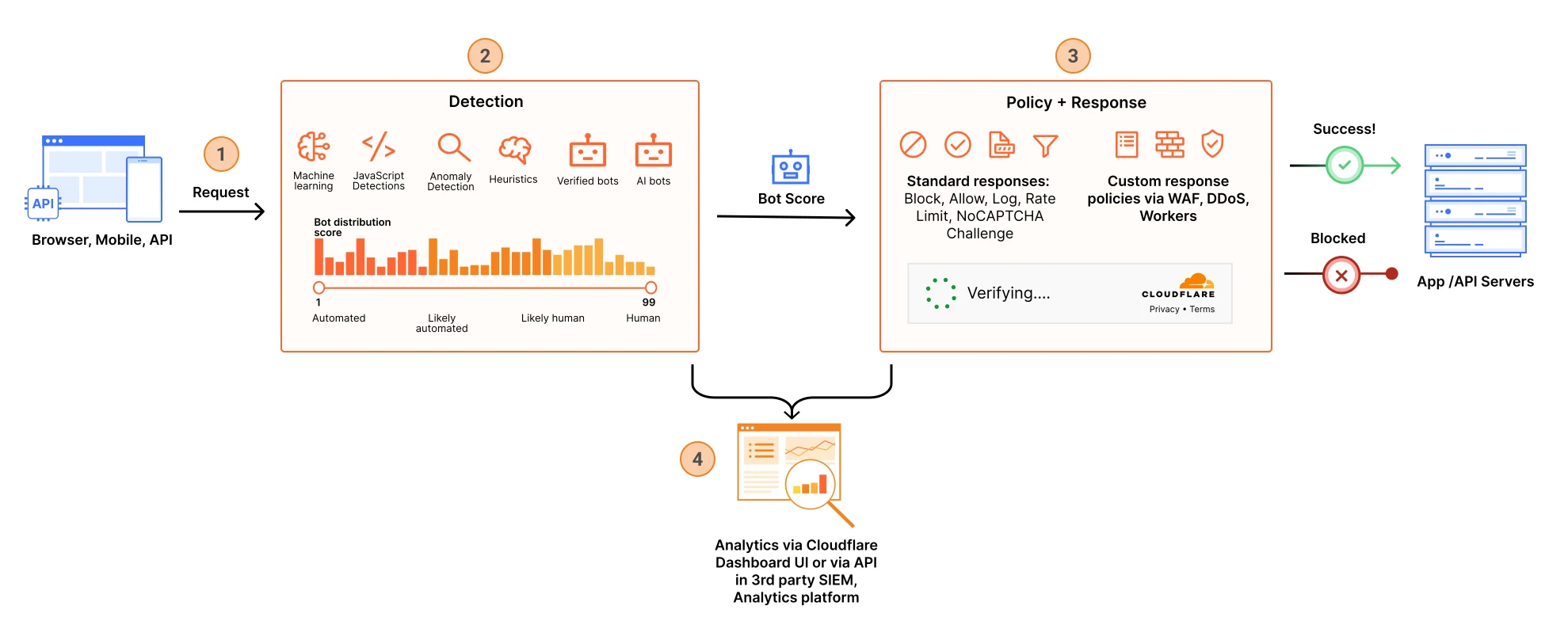
Sơ đồ kiến trúc (Cloudflare Docs) Architecture diagrams (Cloudflare Docs)

Figure 1: How Cloudflare identifies, scores and processes traffic from bots.

Bot management Bot management

Luồng phát hiện, chấm điểm và xử lý bot traffic trên edge — nền tảng cho WAF, rate limit và Bot Management. Cloudflare has bot management capabilities to help identify and mitigate automated traffic to protect domains from bad bots.

Thuật ngữ: Concepts: Bot score · Super Bot Fight Mode · WAF · Rate limiting

Sơ đồ chính thức ↗ Official diagram ↗ · Bots Bots

Sản phẩm liên quan Related products

Đọc thêm trong hub → Read more in the hub →