Lộ trình đang họcCurrent learning pathCurrent learning path
Cloudflare OneCloudflare OneCloudflare One
Bảo vệ users, access, SaaS và networks — follow-along từ tài khoản đến go-live.Secure users, access, SaaS, and networks — follow along from account to go-live.Secure users, access, SaaS, and networks — follow along from account to go-live.
Triển khai Zero Trust theo từng mô-đun: identity, thiết bị, ZTNA, Gateway, DLP, AI và Cloudflare WANDeploy Zero Trust module by module: identity, devices, ZTNA, Gateway, DLP, AI, and Cloudflare WANDeploy Zero Trust module by module: identity, devices, ZTNA, Gateway, DLP, AI, and Cloudflare WAN
9 bài kiến thức
· 2 bài tham chiếu · 22 lab (hub) · ~651 phút (tổng ước lượng các phần) 9 knowledge
· 2 reference · 22 hub labs · ~651 min (estimated total) 9 knowledge
· 2 reference · 22 hub labs · ~651 min (estimated total)
Lộ trình Zero Trust / SASE bám theo hướng dẫn onboarding Cloudflare One: tài khoản, identity, Cloudflare One Client, Access (ZTNA), Gateway, DLP, kiểm soát AI và (tuỳ chọn) Cloudflare WAN. Làm theo thứ tự — mỗi mô-đun xây trên mô-đun trước. Pilot → validate → expand; dừng sau bất kỳ phần nào vẫn có giá trị.A Zero Trust / SASE path aligned with the Cloudflare One onboarding guide: account, identity, Cloudflare One Client, Access (ZTNA), Gateway, DLP, AI controls, and (optionally) Cloudflare WAN. Work in order — each module builds on the last. Pilot → validate → expand; stopping after any module still leaves something useful.A Zero Trust / SASE path aligned with the Cloudflare One onboarding guide: account, identity, Cloudflare One Client, Access (ZTNA), Gateway, DLP, AI controls, and (optionally) Cloudflare WAN. Work in order — each module builds on the last. Pilot → validate → expand; stopping after any module still leaves something useful.
Đọc phần kiến thức trước, rồi làm lab. Thời lượng là ước lượng.Read the knowledge sections first, then do the labs. Times are estimates.Read the knowledge sections first, then do the labs. Times are estimates.
Bắt đầu tại đây (START HERE)START HEREចាប់ផ្តើមនៅទីនេះ (START HERE)
Đọc bài kiến thức của từng phần trước, rồi làm lab. Chọn team name và nhóm pilot trước khi bấm dashboard. Dừng sau một phần vẫn còn dùng được.Read each part’s knowledge lesson, then do the lab. Pick the team name and the pilot group before you click through the dashboard. Stopping after one part still leaves something you can use.អានមេរៀនចំណេះដឹងនៃផ្នែកនីមួយៗមុន រួចធ្វើ lab។ ជ្រើស team name និងក្រុម pilot មុនពេលចុច dashboard។ បញ្ឈប់បន្ទាប់ពីផ្នែកមួយ នៅតែមានអ្វីប្រើបាន។
Trước khi tạo tổ chứcBefore you create the organizationមុនពេលបង្កើតអង្គភាព
Email công việc nhận được thư, và bật 2FA cho adminA work email that can receive mail, and 2FA on for the adminអ៊ីមែលការងារដែលទទួលសំបុត្របាន និងបើក 2FA សម្រាប់ admin
Quyền admin trên IdP (Entra ID, Okta hoặc Google) khi tới phần đăng nhậpAdmin on the IdP (Entra ID, Okta, or Google) when you reach loginសិទ្ធិ admin លើ IdP (Entra ID, Okta ឬ Google) ពេលដល់ផ្នែកចូល
Team name ngắn. Nó thành https://<team>.cloudflareaccess.comA short team name. It becomes https://<team>.cloudflareaccess.comTeam name ខ្លី។ វាក្លាយជា https://<team>.cloudflareaccess.com
Nhóm pilot 5–25 người và một app nội bộ đầu tiênA pilot of 5–25 people and one first private appក្រុម pilot 5–25 នាក់ និង app ខាងក្នុងដំបូងមួយ
Sẵn sàng nhập payment details. Gói Free vẫn cần bước này và không bị tính phíReady to enter payment details. The Free plan still needs this step and you are not chargedរួចរាល់បញ្ចូល payment details។ គម្រោង Free នៅតែត្រូវការជំហាននេះ ហើយមិនគិតថ្លៃ
Gói nào cần cho từng lớp?Which plan for each layer?Plan មួយណាសម្រាប់ស្រទាប់នីមួយៗ?
Số và câu trong bảng lấy từ docs ngày 2026-11-14. Ô không có câu trích thì để trống ý “xem dashboard”, không bịa hạn mức. Đây không phải báo giá.The sentences in the table come from the docs on 2026-11-14. A cell without a quote says to check the dashboard. Nothing here is a price quote.ប្រយោគក្នុងតារាងយកពី docs ថ្ងៃ 2026-11-14។ ប្រអប់គ្មានសម្រង់ នោះសុំមើល dashboard។ នេះមិនមែនការដេញថ្លៃ។
Khả năngCapabilityសមត្ថភាព
Free
Pro / Business / EnterprisePro / Business / EnterprisePro / Business / Enterprise
Tổ chức Zero TrustZero Trust organizationZero Trust organization
Chọn gói và nhập payment details. Free không bị tính phíSelect a plan and enter payment details. Free is not chargedSelect a plan and enter payment details. Free is not charged
Pay-as-you-go hoặc Contract. Xem trang plansPay-as-you-go or Contract. See the plans pagePay-as-you-go or Contract. See the plans page
DLPDLPDLP
Hai profile sẵn: Financial Information, và Social Security, Insurance, Tax, and Identifier NumbersTwo predefined profiles: Financial Information, and Social Security, Insurance, Tax, and Identifier NumbersTwo predefined profiles: Financial Information, and Social Security, Insurance, Tax, and Identifier Numbers
Bộ đầy đủ là add-on của Zero Trust EnterpriseThe full set is an add-on to Zero Trust EnterpriseThe full set is an add-on to Zero Trust Enterprise
Trang sản phẩm không nói có trên FreeThe product page does not say it is included on FreeThe product page does not say it is included on Free
Add-on của Pay-as-you-go và EnterpriseAdd-on to Pay-as-you-go and EnterpriseAdd-on to Pay-as-you-go and Enterprise
Cloudflare WANCloudflare WANCloudflare WAN
Không. Sản phẩm Enterprise-onlyNo. The product is Enterprise-onlyNo. The product is Enterprise-only
Enterprise-only. Liên hệ CloudflareEnterprise-only. Contact CloudflareEnterprise-only. Contact Cloudflare
Số chỗ ngồiSeatsSeats
Không chép số. Một seat bị dùng khi user đăng nhập hoặc enroll clientNo number copied here. A seat is used when a user signs in or enrolls the clientNo number copied here. A seat is used when a user signs in or enrolls the client
Xem trang plans và dashboardSee the plans page and the dashboardSee the plans page and the dashboard
Không phải báo giá. Đối chiếu product docs và dashboard. Kiểm tra lần cuối: 2026-11-14.Not a price quote. Check the product docs and the dashboard. Last checked: 2026-11-14.មិនមែនការដេញថ្លៃ។ ផ្ទៀង product docs និង dashboard។ ពិនិត្យចុងក្រោយ: 2026-11-14។
Ai nên học lộ trình này?Who is this for?Who is this for?
IT admin, security, identity hoặc founder cần bảo vệ nhân viên, remote work, SaaS và app nội bộ — thay VPN hoặc bổ sung SWG/DLP. Không cần kinh nghiệm Cloudflare trước.IT admins, security, identity, or founders securing employees, remote work, SaaS, and internal apps — replacing VPN or adding SWG/DLP. No prior Cloudflare experience required.IT admins, security, identity, or founders securing employees, remote work, SaaS, and internal apps — replacing VPN or adding SWG/DLP. No prior Cloudflare experience required.
Mô hình tư duyMental modelMental model
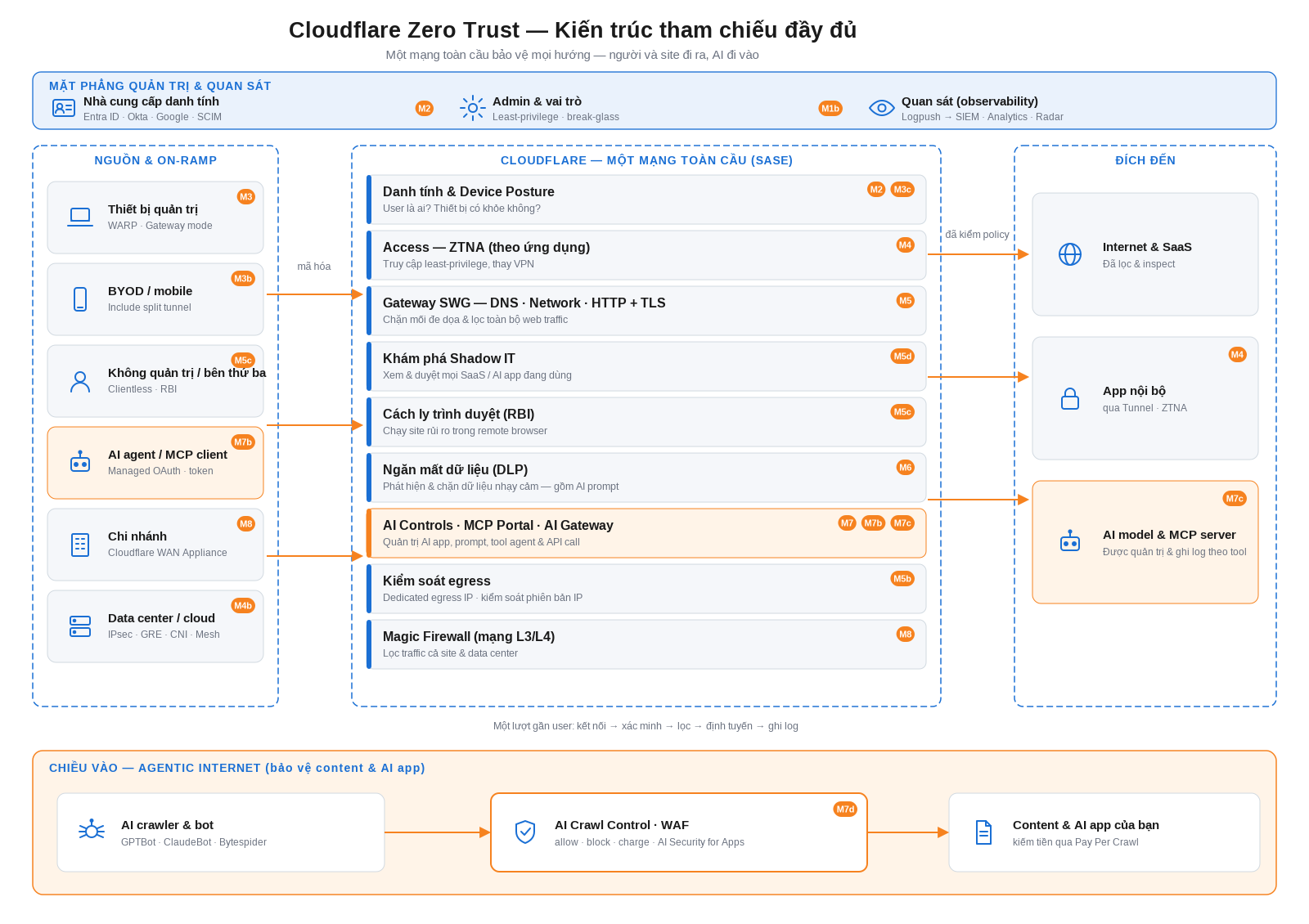
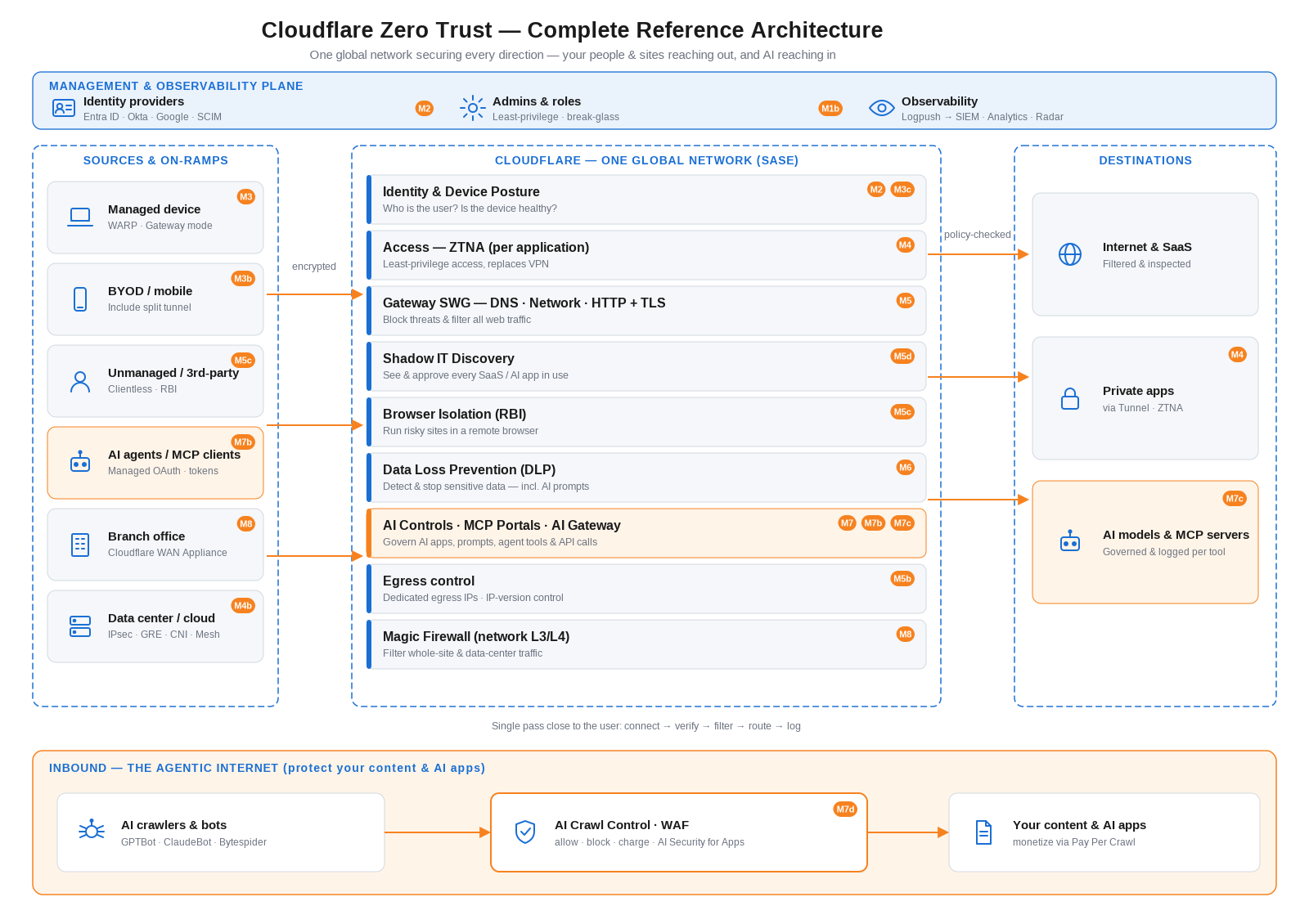
User/device (hoặc chi nhánh Cloudflare WAN) → Cloudflare edge: (1) Identity (2) Posture (3) Access/ZTNA (4) Gateway (5) DLP (6) AI controls → Internet / SaaS / private app (qua Tunnel). Kiểm tra mọi request; không mở toàn mạng như VPN.User/device (or a Cloudflare WAN site) → Cloudflare edge: (1) Identity (2) Posture (3) Access/ZTNA (4) Gateway (5) DLP (6) AI controls → Internet / SaaS / private app (via Tunnel). Check every request; no full-network access like VPN.User/device (or a Cloudflare WAN site) → Cloudflare edge: (1) Identity (2) Posture (3) Access/ZTNA (4) Gateway (5) DLP (6) AI controls → Internet / SaaS / private app (via Tunnel). Check every request; no full-network access like VPN.
Sơ đồ kiến trúc tham chiếuReference architecture diagramsReference architecture diagrams
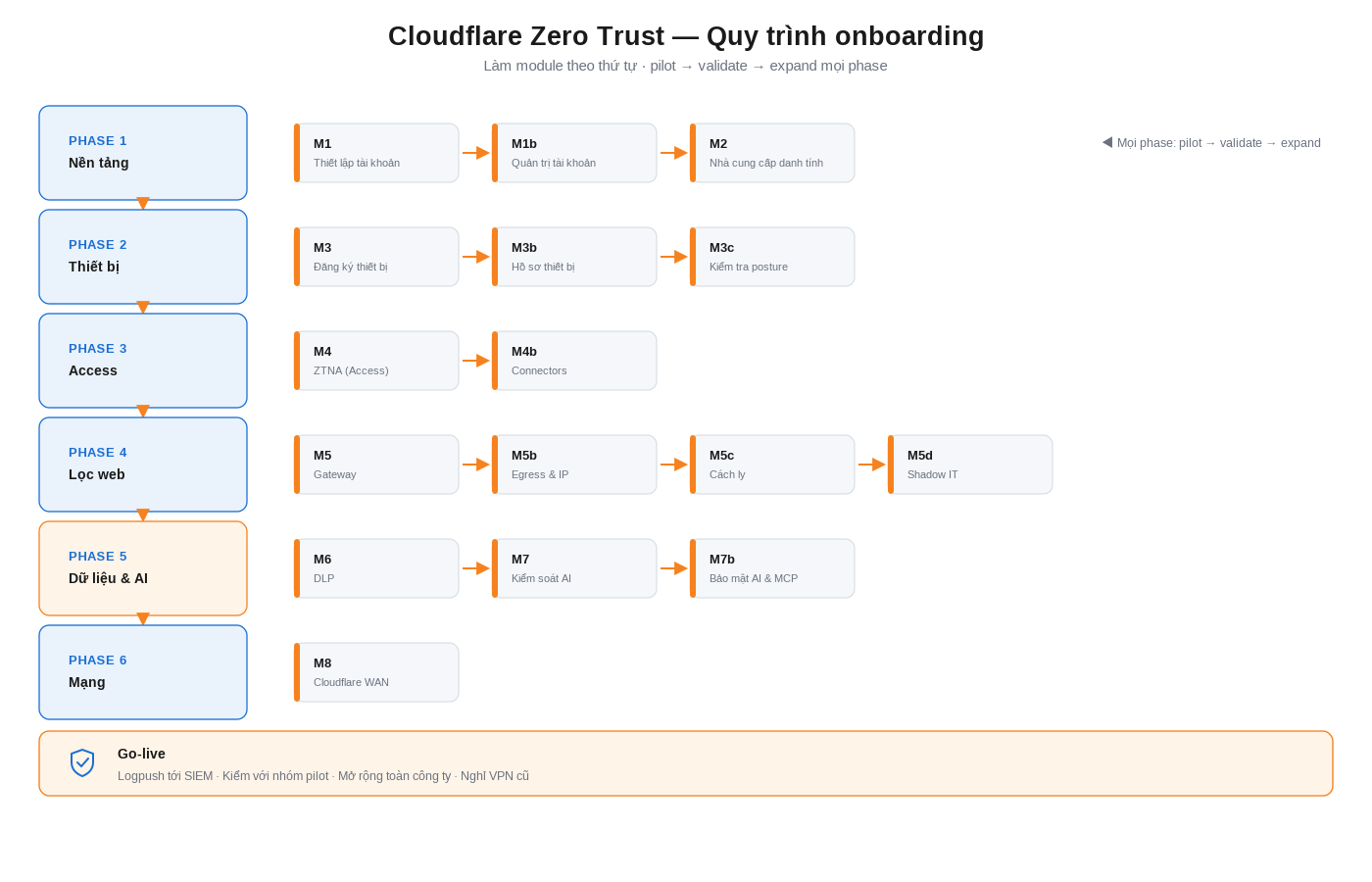
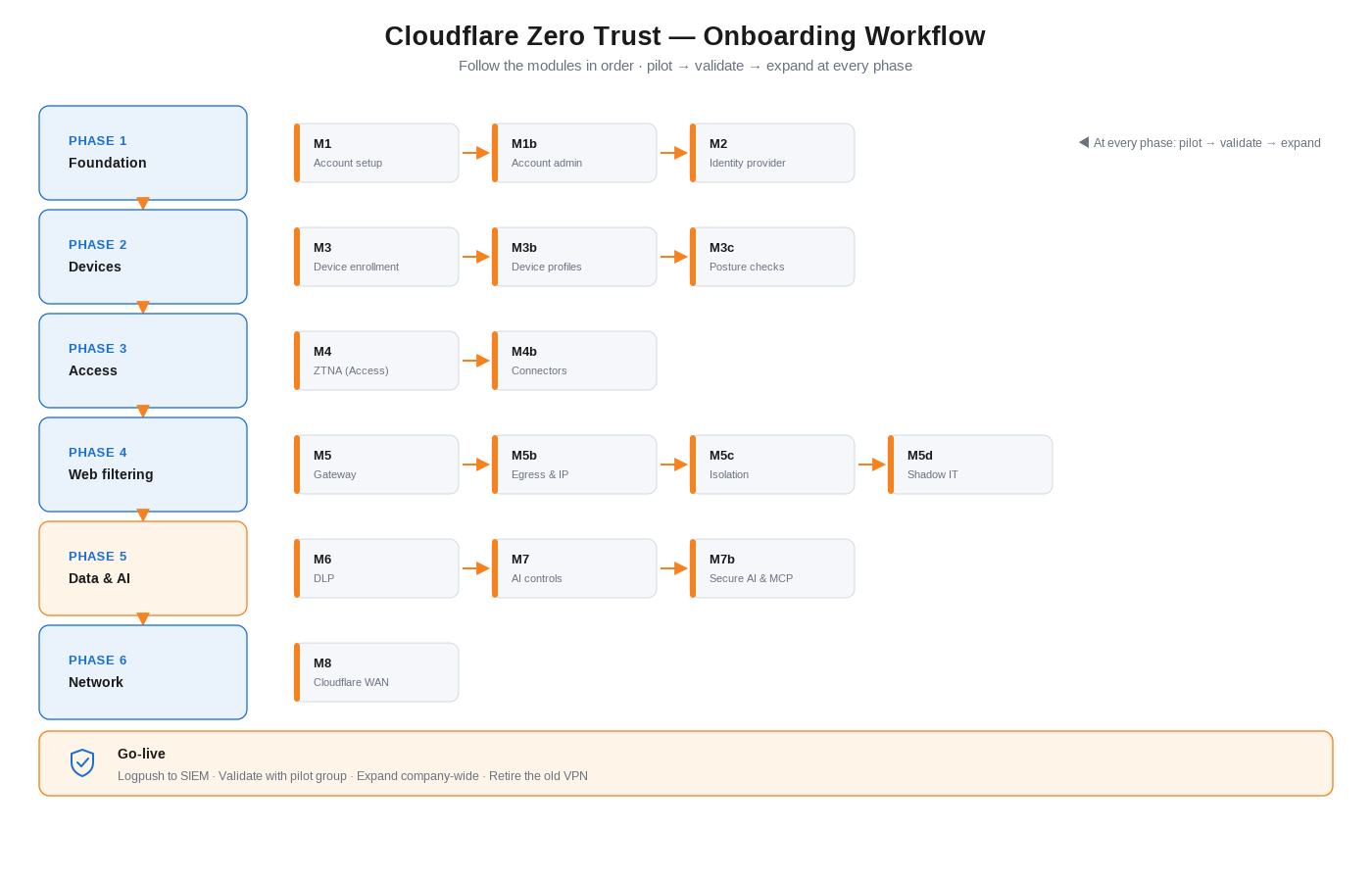
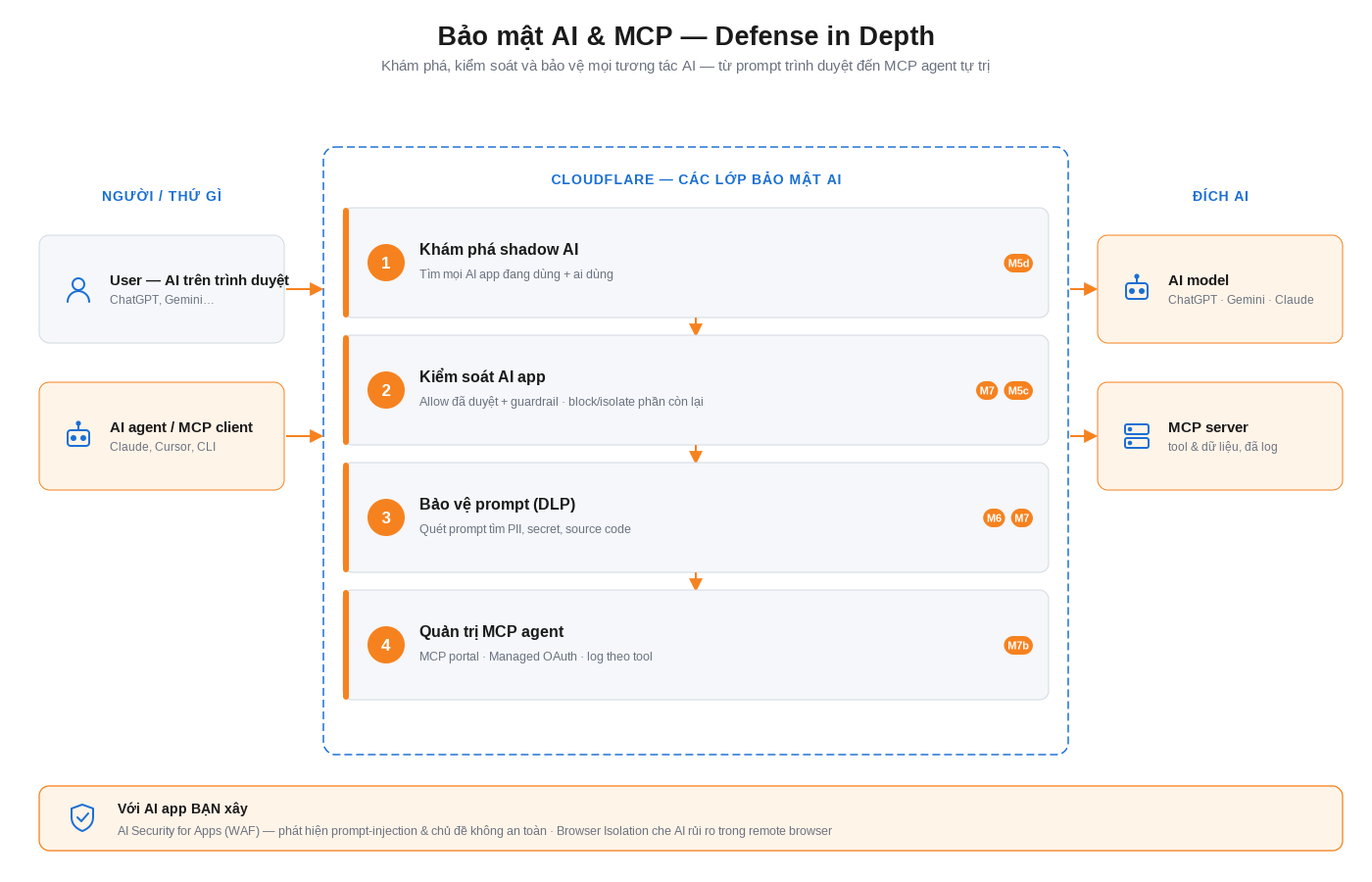
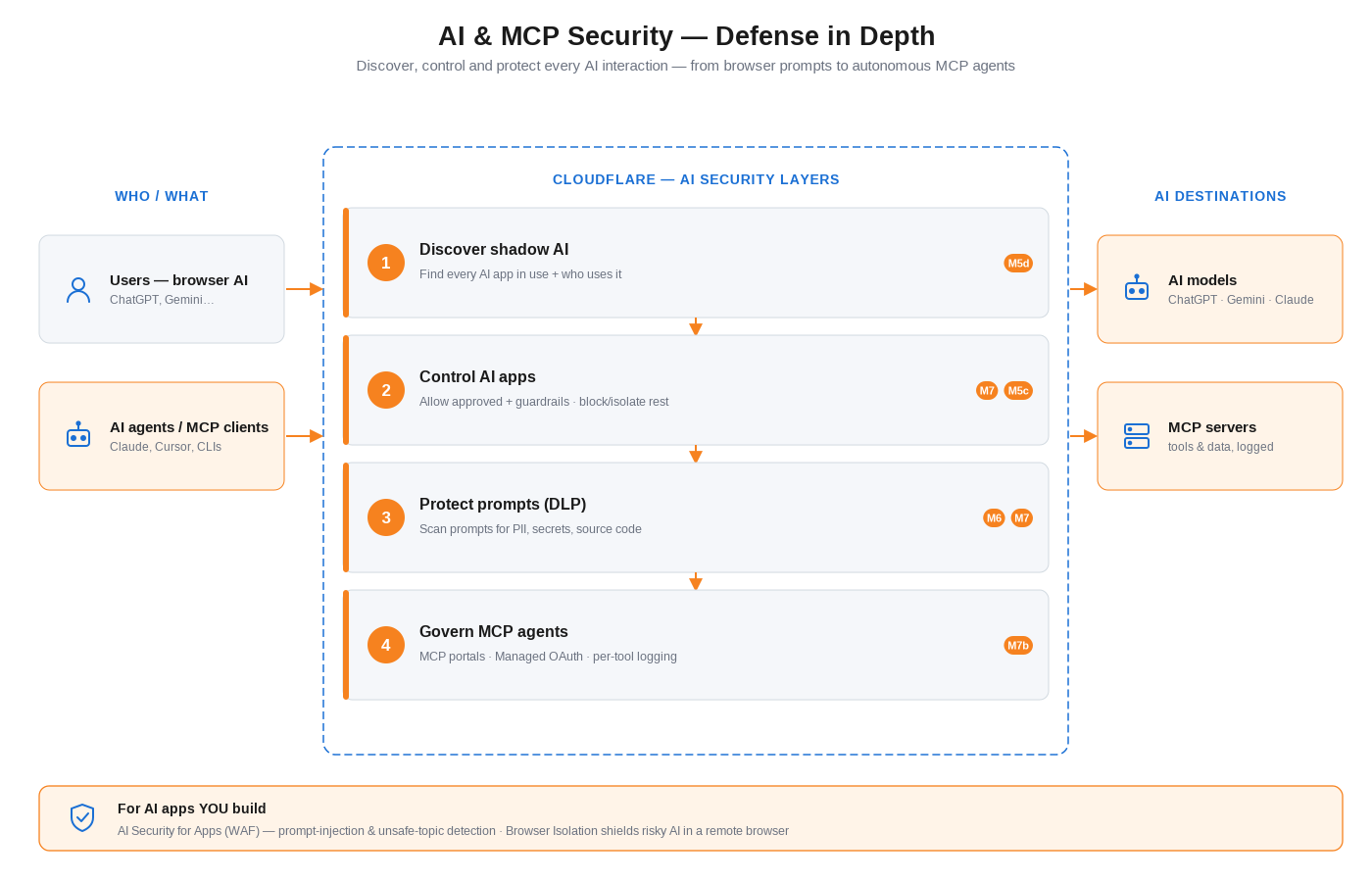
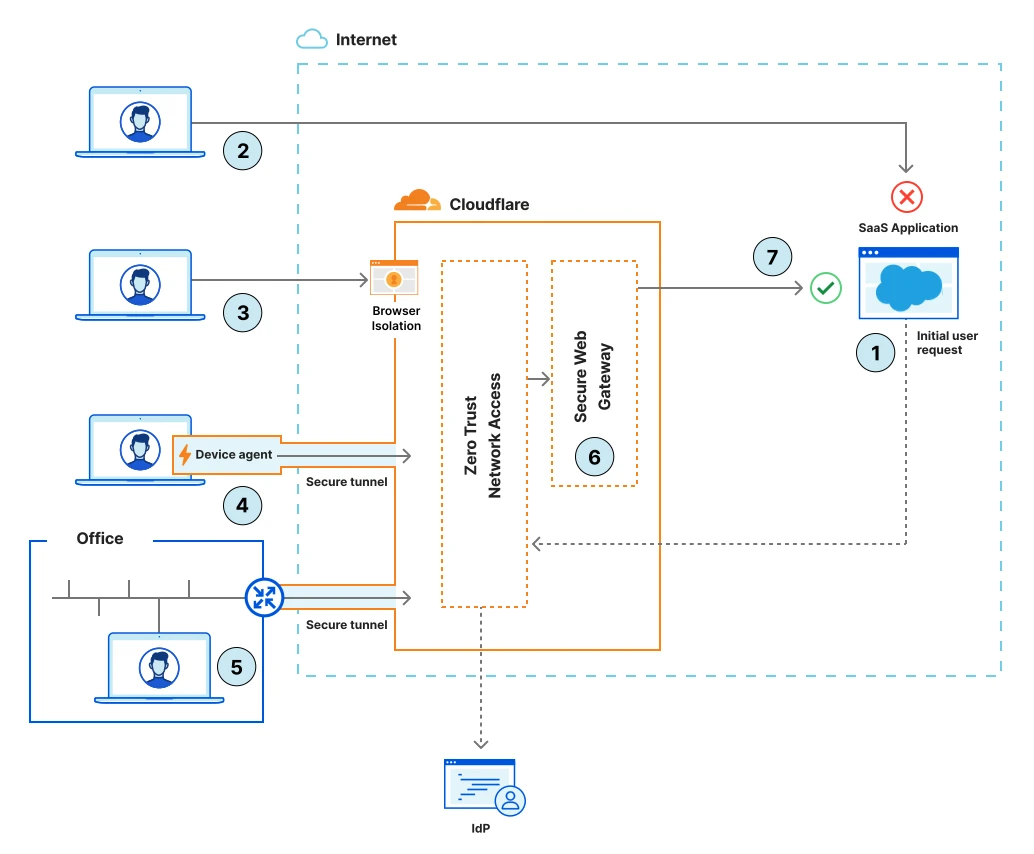
Ba sơ đồ gốc từ hướng dẫn onboarding: kiến trúc đầy đủ, thứ tự triển khai, và bốn lớp bảo mật AI/MCP. Huy hiệu M1–M8 khớp từng module bên dưới.Three diagrams from the onboarding guide: the complete architecture, rollout order, and four AI/MCP security layers. M1–M8 badges match each module below.Three diagrams from the onboarding guide: the complete architecture, rollout order, and four AI/MCP security layers. M1–M8 badges match each module below.
Kiến trúc tham chiếu đầy đủ — mặt phẳng quản trị (trên), xương sống Zero Trust chiều ra (giữa), và làn Agentic Internet chiều vào (dưới). Huy hiệu gắn từng khối với module tương ứng.Complete reference architecture — management plane (top), outbound Zero Trust spine (middle), and the inbound Agentic Internet lane (bottom). Badges map each element to its module.Complete reference architecture — management plane (top), outbound Zero Trust spine (middle), and the inbound Agentic Internet lane (bottom). Badges map each element to its module.
Quy trình onboarding — sáu phase từ nền tảng tài khoản đến kết nối mạng, rồi go-live. Mọi phase: pilot → validate → expand.Onboarding workflow — six phases from account foundation to network connectivity, then go-live. At every phase: pilot → validate → expand.Onboarding workflow — six phases from account foundation to network connectivity, then go-live. At every phase: pilot → validate → expand.
Bảo mật AI và MCP — bốn lớp defense-in-depth giữa user/agent và nhà cung cấp AI, cộng AI Security for Apps (WAF) cho AI mà bạn xây.AI & MCP security — four defense-in-depth layers between users/agents and AI providers, plus AI Security for Apps (WAF) for the AI you build.AI & MCP security — four defense-in-depth layers between users/agents and AI providers, plus AI Security for Apps (WAF) for the AI you build.
Sau lộ trình bạn sẽWhat you will achieveអ្វីដែលអ្នកនឹងសម្រេច
Tạo tổ chức Cloudflare One, chọn team name (URL đăng nhập) và break-glass adminCreate a Cloudflare One organization, lock in the team name (login URL), and keep a break-glass adminCreate a Cloudflare One organization, lock in the team name (login URL), and keep a break-glass admin
Kết nối IdP (Entra ID / Okta / Google), kiểm tra group claims và bật MFAConnect an IdP (Entra ID / Okta / Google), verify group claims, and require MFAConnect an IdP (Entra ID / Okta / Google), verify group claims, and require MFA
Enroll Cloudflare One Client (WARP), cấu hình device profile và postureEnroll the Cloudflare One Client (WARP), configure device profiles, and add posture checksEnroll the Cloudflare One Client (WARP), configure device profiles, and add posture checks
Publish app nội bộ đầu tiên bằng Tunnel + Access — không mở inbound firewallPublish a first private app with Tunnel + Access — no inbound firewall portsPublish a first private app with Tunnel + Access — no inbound firewall ports
Bật Gateway theo lớp DNS → Network → HTTP/TLS; Shadow IT và RBI khi sẵn sàngRoll out Gateway in layers: DNS → Network → HTTP/TLS; add Shadow IT and RBI when readyRoll out Gateway in layers: DNS → Network → HTTP/TLS; add Shadow IT and RBI when ready
Pilot DLP log-only rồi enforce; quản trị AI (không cấm mù) gồm MCP và AI GatewayPilot DLP in log-only then enforce; govern AI (do not blind-ban) including MCP and AI GatewayPilot DLP in log-only then enforce; govern AI (do not blind-ban) including MCP and AI Gateway
Khái niệm cần nắmKey conceptsគោលគំនិតសំខាន់
Zero Trust
ZTNA
Identity provider
Cloudflare One Client
Device posture
Cloudflare Tunnel
SWG
Gateway
Browser Isolation
CASB
DLP
AI controls
MCP portals
AI Gateway
Cloudflare WAN
Lỗi thường gặpCommon mistakesកំហុសញឹកញាប់
Big-bang thay vì pilot → validate → expandBig-bang instead of pilot → validate → expandBig-bang instead of pilot → validate → expand
Kiến trúc tham chiếu SASE khuyên 1–2 use case (thay VPN, rồi SWG). Mỗi phase: nhóm 5–25 user, rollback, rồi mới expand. Cutover một đêm gây outage.The SASE reference architecture recommends one or two use cases (VPN replacement, then SWG). Each phase: 5–25 users, a rollback, then expand. Overnight cutovers cause outages.The SASE reference architecture recommends one or two use cases (VPN replacement, then SWG). Each phase: 5–25 users, a rollback, then expand. Overnight cutovers cause outages.
Team name chọn bừaPicking the team name casuallyPicking the team name casually
Team name thành `https://<name>.cloudflareaccess.com` — đổi sau phá login URL, Access app và enrollment. Chọn tên ngắn, bền trước Module 1.The team name becomes `https://<name>.cloudflareaccess.com` — changing it later breaks login URLs, Access apps, and enrollment. Choose a short, durable name before Module 1.The team name becomes `https://<name>.cloudflareaccess.com` — changing it later breaks login URLs, Access apps, and enrollment. Choose a short, durable name before Module 1.
Bỏ MFA tại IdP hoặc không Test group claimsSkipping MFA at the IdP or not Testing group claimsSkipping MFA at the IdP or not Testing group claims
Access chỉ mạnh bằng IdP. Bật MFA ở Entra/Okta/Google và xác nhận Test hiện groups trước khi viết policy theo group.Access is only as strong as your IdP. Require MFA in Entra/Okta/Google and confirm Test shows groups before writing group-based policies.Access is only as strong as your IdP. Require MFA in Entra/Okta/Google and confirm Test shows groups before writing group-based policies.
TLS inspect / DLP / AI prompt scan không có Do Not InspectTLS inspect / DLP / AI prompt scan without Do Not InspectTLS inspect / DLP / AI prompt scan without Do Not Inspect
HTTP inspection cần root CA. Cert-pinned apps và Microsoft 365 cần exception. DLP/AI chỉ thấy traffic đã decrypt. Log-only trước Block.HTTP inspection needs the root CA. Certificate-pinned apps and Microsoft 365 need exceptions. DLP/AI only see decrypted traffic. Log-only before Block.HTTP inspection needs the root CA. Certificate-pinned apps and Microsoft 365 need exceptions. DLP/AI only see decrypted traffic. Log-only before Block.
BYOD chạy Exclude / full tunnelBYOD on Exclude / full tunnelBYOD on Exclude / full tunnel
Exclude trên máy cá nhân đưa browsing riêng tư qua công ty. BYOD dùng Include chỉ app/mạng công ty; managed laptop mới Exclude.Exclude on personal devices routes private browsing through the company. BYOD uses Include for company apps/networks only; managed laptops use Exclude.Exclude on personal devices routes private browsing through the company. BYOD uses Include for company apps/networks only; managed laptops use Exclude.
Mở inbound thay vì Tunnel outbound; không break-glassInbound ports instead of outbound Tunnel; no break-glassInbound ports instead of outbound Tunnel; no break-glass
cloudflared chỉ cần outbound 7844. Giữ ≥2 Super Admin và Cloudflare login/OTP nếu Access bọc dashboard. Token API account-owned, có expiry.cloudflared only needs outbound 7844. Keep ≥2 Super Admins and Cloudflare login/OTP if Access wraps the dashboard. Use account-owned API tokens with expiry.cloudflared only needs outbound 7844. Keep ≥2 Super Admins and Cloudflare login/OTP if Access wraps the dashboard. Use account-owned API tokens with expiry.
Cấm AI thay vì governBanning AI instead of governing itBanning AI instead of governing it
Block ChatGPT đẩy usage sang điện thoại — mất log. Discover → allow có DLP/RBI → block có chủ đích. MCP cần Access làm OAuth, không chỉ ẩn trên portal.Blocking ChatGPT pushes usage onto phones — you lose logs. Discover → allow with DLP/RBI → block on purpose. MCP needs Access as OAuth, not merely hiding tools on a portal.Blocking ChatGPT pushes usage onto phones — you lose logs. Discover → allow with DLP/RBI → block on purpose. MCP needs Access as OAuth, not merely hiding tools on a portal.
Kiến thức và labKnowledge and labsKnowledge and labs
Bắt buộcRequiredចាំបាច់~50 phút~50 min~50 min4 bài4 lessons4 lessons
Phần 1: Kiến trúc và tài khoảnPart 1: Architecture and accountPart 1: Architecture and account
Bức tranh SASE, checklist trước khi bắt đầu, tạo tổ chức Cloudflare One và quản trị admin least-privilege.The SASE picture, pre-start checklist, creating the Cloudflare One organization, and least-privilege admins.The SASE picture, pre-start checklist, creating the Cloudflare One organization, and least-privilege admins.
Cloudflare One là nền tảng SASE: mạng và kiểm tra bảo mật nằm cùng một chỗ.Cloudflare One is a SASE platform: the network and the security checks live in one place.Cloudflare One is a SASE platform: the network and the security checks live in one place.
Không cần bài trước.No prerequisites.No prerequisites.
Bạn tạo tổ chức Zero Trust, chọn team name, và giữ một admin dự phòng.You create a Zero Trust organization, pick a team name, and keep a backup admin.You create a Zero Trust organization, pick a team name, and keep a backup admin.
Đăng ký dash.cloudflare.com, xác thực email, bật 2FA cho admin.Sign up at dash.cloudflare.com, verify email, and enable admin 2FA.Sign up at dash.cloudflare.com, verify email, and enable admin 2FA.
Admin nhận account role; nhân viên dùng dịch vụ chỉ cần enrollment + Access policy — không cần role trên account.Admins get account roles; employees using the service only need enrollment + Access policies — not an account role.Admins get account roles; employees using the service only need enrollment + Access policies — not an account role.
Bắt buộcRequiredចាំបាច់~45 phút~45 min~45 min3 bài3 lessons3 lessons
Phần 2: Identity providerPart 2: Identity providerPart 2: Identity provider
Kết nối đăng nhập công ty — nền cho mọi policy Access, enrollment và Gateway sau này.Connect corporate login — the foundation for every later Access, enrollment, and Gateway policy.Connect corporate login — the foundation for every later Access, enrollment, and Gateway policy.
IdP là hệ thống đăng nhập sẵn có: Entra ID, Okta, hoặc Google.The IdP is the login system you already have: Entra ID, Okta, or Google.The IdP is the login system you already have: Entra ID, Okta, or Google.
Dùng Test trên IdP: phải thấy email và groups.Use Test on the IdP: you should see email and groups.Use Test on the IdP: you should see email and groups.
Cloudflare One Client (trước đây gọi là WARP) là app trên máy.The Cloudflare One Client (formerly WARP) is the app on the device.The Cloudflare One Client (formerly WARP) is the app on the device.
Laptop công ty: Default profile → Gateway with WARP, Switch Locked on, Auto connect 1 phút.Company laptops: Default profile → Gateway with WARP, Switch Locked on, Auto connect 1 minute.Company laptops: Default profile → Gateway with WARP, Switch Locked on, Auto connect 1 minute.
Phần 4: ZTNA — Access và connectorsPart 4: ZTNA — Access and connectorsPart 4: ZTNA — Access and connectors
Publish app theo identity, không theo toàn mạng — Tunnel outbound, policy group, Mesh/Appliance khi cần site-to-site.Publish apps by identity, not by whole network — outbound Tunnel, group policies, Mesh/Appliance when you need site-to-site.Publish apps by identity, not by whole network — outbound Tunnel, group policies, Mesh/Appliance when you need site-to-site.
Tunnel: app/server và CIDR riêng, một chiều tới Cloudflare.Tunnel: apps/servers and private CIDRs, one-way to Cloudflare.Tunnel: apps/servers and private CIDRs, one-way to Cloudflare.
Phần 5: Gateway — lọc web và Shadow ITPart 5: Gateway — web filtering and Shadow ITPart 5: Gateway — web filtering and Shadow IT
DNS trước, rồi Network, rồi HTTP/TLS. Egress, Browser Isolation và khám phá SaaS/AI khi đã ổn định.DNS first, then Network, then HTTP/TLS. Add egress, Browser Isolation, and SaaS/AI discovery once that is stable.DNS first, then Network, then HTTP/TLS. Add egress, Browser Isolation, and SaaS/AI discovery once that is stable.
Dedicated egress IPs khi SaaS allowlist theo IP công ty.Dedicated egress IPs when SaaS allowlists your company IPs.Dedicated egress IPs when SaaS allowlists your company IPs.
Cô lập browsing rủi ro trên browser remote — clipboard, upload, print có thể tắt.Isolate risky browsing in a remote browser — clipboard, upload, and print can be disabled.Isolate risky browsing in a remote browser — clipboard, upload, and print can be disabled.
CASB / Shadow IT: inventory SaaS và AI tools đang dùng, owner và độ nhạy dữ liệu.CASB / Shadow IT: inventory SaaS and AI tools in use, owners, and data sensitivity.CASB / Shadow IT: inventory SaaS and AI tools in use, owners, and data sensitivity.
Phần 6: DLP — bảo vệ dữ liệuPart 6: DLP — data protectionPart 6: DLP — data protection
Phát hiện dữ liệu nhạy cảm trên HTTP đã giải mã. Free và Pay-as-you-go có hai profile sẵn. Bộ đầy đủ là add-on Enterprise.Detect sensitive data on decrypted HTTP. Free and Pay-as-you-go include two predefined profiles. The full set is an Enterprise add-on.Detect sensitive data on decrypted HTTP. Free and Pay-as-you-go include two predefined profiles. The full set is an Enterprise add-on.
DLP quét traffic web, file SaaS và prompt AI để tìm dữ liệu nhạy cảm.DLP scans web traffic, SaaS files, and AI prompts for sensitive data.DLP scans web traffic, SaaS files, and AI prompts for sensitive data.
Sau baseline: Block (hoặc Isolate) khi DLP match tới unsanctioned file sharing / AI / personal email.After a baseline: Block (or Isolate) on DLP match to unsanctioned file sharing / AI / personal email.After a baseline: Block (or Isolate) on DLP match to unsanctioned file sharing / AI / personal email.
Phần 7: Kiểm soát AI, MCP và crawlerPart 7: AI controls, MCP, and crawlersPart 7: AI controls, MCP, and crawlers
Govern AI workforce (đừng cấm), MCP portals, AI Gateway cho app/agent, và AI crawler trên content public.Govern workforce AI (do not ban), MCP portals, AI Gateway for apps/agents, and AI crawlers on your public content.Govern workforce AI (do not ban), MCP portals, AI Gateway for apps/agents, and AI crawlers on your public content.
Ba việc khác nhau: thấy công cụ AI nhân viên đang dùng, chặn dữ liệu nhạy cảm trong prompt, và đặt AI Gateway trước model mà app của bạn gọi.Three different jobs: see which AI tools employees use, stop sensitive data in a prompt, and put AI Gateway in front of the model your own app calls.Three different jobs: see which AI tools employees use, stop sensitive data in a prompt, and put AI Gateway in front of the model your own app calls.
Cấm ChatGPT khiến người dùng sang điện thoại — mất visibility.Banning ChatGPT pushes people onto phones — you lose visibility.Banning ChatGPT pushes people onto phones — you lose visibility.
Đưa MCP server nội bộ sau Access; portal một URL với tool đã curate, identity per-user và log.Put internal MCP servers behind Access; one portal URL with curated tools, per-user identity, and logs.Put internal MCP servers behind Access; one portal URL with curated tools, per-user identity, and logs.
AI Gateway ngồi trước model provider — không cần WARP hay TLS decrypt.AI Gateway sits in front of model providers — no WARP or TLS decrypt required.AI Gateway sits in front of model providers — no WARP or TLS decrypt required.
Phần 8: Cloudflare WAN (tuỳ chọn)Part 8: Cloudflare WAN (optional)Part 8: Cloudflare WAN (optional)
Nối office, DC và cloud vào Cloudflare để cả site — không chỉ laptop WARP — được lọc và định tuyến. Enterprise; đụng production network.Connect offices, DCs, and cloud to Cloudflare so whole sites — not only WARP laptops — are filtered and routed. Enterprise; this touches production networking.Connect offices, DCs, and cloud to Cloudflare so whole sites — not only WARP laptops — are filtered and routed. Enterprise; this touches production networking.
Cloudflare WAN (trước đây là Magic WAN) nối cả văn phòng, trung tâm dữ liệu và cloud vào Cloudflare.Cloudflare WAN (formerly Magic WAN) connects whole offices, data centers, and cloud networks to Cloudflare.Cloudflare WAN (formerly Magic WAN) connects whole offices, data centers, and cloud networks to Cloudflare.
Tham chiếuReferenceឯកសារយោង~20 phút~20 min~20 min2 bài2 lessons2 lessons
Phần 9: Tham chiếu — thực hành tốt và sổ tay cấu hìnhPart 9: Reference — best practices and configuration runbookPart 9: Reference — best practices and configuration runbook
Hướng dẫn chiến lược rollout (10 golden rules) và bảng cấu hình đầy đủ từng field trên dashboard.Rollout strategy (10 golden rules) and the full dashboard field-by-field configuration runbook.Rollout strategy (10 golden rules) and the full dashboard field-by-field configuration runbook.
Tham chiếuReferenceReference~15 phút~15 min~15 min
Bản đồ chỗ bấm, không phải bảng giá trị mẫu.A map of where to click, not a table of sample values.A map of where to click, not a table of sample values.
Công cụ hỗ trợ vận hànhOperational toolsOperational tools
Công cụ thực hành áp dụng ngay khi vận hành và xử lý sự cố.Hands-on tools to apply while operating and handling incidents.Hands-on tools to apply while operating and handling incidents.
Từng bước click-by-click: account, identity, thiết bị, ZTNA, Gateway, DLP, AI và Cloudflare WAN. Có bản tiếng Việt. Đây là hướng dẫn cộng đồng — không phải tài liệu chính thức của Cloudflare.Click-by-click modules: account, identity, devices, ZTNA, Gateway, DLP, AI, and Cloudflare WAN. Vietnamese available. Community guide — not an official Cloudflare publication.Click-by-click modules: account, identity, devices, ZTNA, Gateway, DLP, AI, and Cloudflare WAN. Vietnamese available. Community guide — not an official Cloudflare publication.
Bảng tham chiếu nhanh: đường dẫn dashboard, field và giá trị mẫu cho từng mô-đun khi bạn đã hiểu luồng.Quick reference: dashboard paths, fields, and sample values for each module once you know the flow.Quick reference: dashboard paths, fields, and sample values for each module once you know the flow.
Thứ tự rollout, 10 golden rules, và chiến lược pilot → validate → expand cho từng phase.Rollout order, 10 golden rules, and the pilot → validate → expand strategy for each phase.Rollout order, 10 golden rules, and the pilot → validate → expand strategy for each phase.
Trình tự học gợi ýSuggested learning orderលំដាប់សិក្សាណែនាំ
Đọc kiến trúc + checklist (team name, pilot 5–25 user, app đầu tiên, plan tier)Read architecture + checklist (team name, 5–25 user pilot, first app, plan tier)Read architecture + checklist (team name, 5–25 user pilot, first app, plan tier)
Tạo Cloudflare One, 2FA admin, Restrict Cloudflare IdP, break-glass Super AdminCreate Cloudflare One, admin 2FA, restrict Cloudflare IdP, break-glass Super AdminCreate Cloudflare One, admin 2FA, restrict Cloudflare IdP, break-glass Super Admin
Kết nối IdP, Test email+groups, MFA tại IdP, SCIM khi sẵn sàngConnect the IdP, Test email+groups, MFA at the IdP, SCIM when readyConnect the IdP, Test email+groups, MFA at the IdP, SCIM when ready
Enrollment permission → cài Cloudflare One Client trên laptop pilotEnrollment permission → install Cloudflare One Client on a pilot laptopEnrollment permission → install Cloudflare One Client on a pilot laptop
Device profile (managed vs BYOD) + posture tái sử dụngDevice profiles (managed vs BYOD) + reusable postureDevice profiles (managed vs BYOD) + reusable posture
Tunnel + Access cho một private app; Access Group thay snowflakeTunnel + Access for one private app; Access Groups instead of snowflakesTunnel + Access for one private app; Access Groups instead of snowflakes
Gateway DNS (block malware) → Network → HTTP/TLS với Do Not InspectGateway DNS (block malware) → Network → HTTP/TLS with Do Not Inspect exceptionsGateway DNS (block malware) → Network → HTTP/TLS with Do Not Inspect exceptions
Shadow IT / AI discovery; DLP log-only rồi block destination rủi roShadow IT / AI discovery; DLP log-only then block high-risk destinationsShadow IT / AI discovery; DLP log-only then block high-risk destinations
Govern AI (MCP, AI Gateway) — không cấm mù; crawler policy cho site publicGovern AI (MCP, AI Gateway) — do not blind-ban; crawler policy for public sitesGovern AI (MCP, AI Gateway) — do not blind-ban; crawler policy for public sites
Tuỳ chọn: Cloudflare WAN một site, failover, rồi expand; retire VPN theo waveOptional: Cloudflare WAN one site, prove failover, then expand; retire VPN in wavesOptional: Cloudflare WAN one site, prove failover, then expand; retire VPN in waves
Tình huống trong lộ trìnhUse cases for this pathករណីប្រើប្រាស់សម្រាប់ផ្លូវនេះ
Tài liệu mở rộng (tùy chọn)Optional extended readingOptional extended readingMởExpandExpandThu gọnCollapseCollapse
Resources, GitHub, Reference Architecture, CloudSecOp, demo — không bắt buộc để hoàn thành lộ trình.
Resources, GitHub, Reference Architecture, CloudSecOp, demos — not required to finish the track.
Resources, GitHub, Reference Architecture, CloudSecOp, demos — not required to finish the track.
Ví dụ triển khai (trong lộ trình này)Deployment examples (this path only)Deployment examples (this path only)
Tutorial và guide từ Cloudflare Resources — chỉ hiển thị nội dung phù hợp lộ trình Cloudflare One. Mỗi bài học gợi ý 4 ví dụ riêng.
Tutorials and guides from Cloudflare Resources — only content matched to the Cloudflare One path. Each lesson suggests four examples.
Tutorials and guides from Cloudflare Resources — only content matched to the Cloudflare One path. Each lesson suggests four examples.
Với Cloudflare cách ly trình duyệt và các chính sách giải quyết, người dùng có thể kết nối với các ứng dụng dựa trên web riêng tư thông qua tên máy chủ riêng của họ.
Sử dụng mạng riêng của Cloudflare Tunnel, người dùng có thể kết nối với các ứng dụng dựa trên TCP/UDP, chẳng hạn như cơ sở dữ liệu. Bạn có thể thiết lập chính sách mạng thực hiện các điều khiển zero trust để xác định ai và những gì access có thể sử dụng các ứng dụng đó bằng cách sử dụng Cloudflare One Client.
Hướng dẫn này cho thấy cách tạo một API cho phép bạn chạy truy vấn an toàn chống lại một cơ sở dữ liệu D1. API có thể được sử dụng để tùy chỉnh các điều khiển access và/hoặc giới hạn các bảng có thể được truy vấn.
Cấu hình theo nhu cầu khách hàng — đường dẫn menu, bước showcase và mẹo demo từ playbook SE. Mở rộng đầy đủ trên trang Script demo.Configure to customer needs — menu paths, showcase steps, and SE playbook tips. Full library on the Demo guides page.Configure to customer needs — menu paths, showcase steps, and SE playbook tips. Full library on the Demo guides page.
Tài liệu sản phẩm, tutorial và ví dụ cho mọi dịch vụ Cloudflare.Product docs, tutorials, and examples for every Cloudflare service.Product docs, tutorials, and examples for every Cloudflare service.
Pattern kiến trúc và best practices — SASE, CDN, Workers, Zero Trust.Architecture patterns and best practices — SASE, CDN, Workers, Zero Trust.Architecture patterns and best practices — SASE, CDN, Workers, Zero Trust.
Cập nhật sản phẩm theo ngày — Agents, Workers, Cloudflare One, R2, security. Hub có bản tóm tắt chọn lọc.Daily product updates — Agents, Workers, Cloudflare One, R2, security. This hub includes a curated summary.Daily product updates — Agents, Workers, Cloudflare One, R2, security. This hub includes a curated summary.
Kiến trúc tham chiếuReference architectureReference architectureNổi bậtFeaturedFeaturedLộ trình:Track:Track: Cloudflare One
Chuyển sang kiến trúc SASE với CloudflareEvolving to a SASE architecture with CloudflareEvolving to a SASE architecture with Cloudflare
Hợp nhất security và networking trên một control plane — thay patchwork appliance bằng Cloudflare One.Consolidate security and networking on one control plane — replace appliance patchwork with Cloudflare One.Consolidate security and networking on one control plane — replace appliance patchwork with Cloudflare One.
Hướng dẫn thiết kếDesign guideDesign guideLộ trình:Track:Track: Cloudflare One
Chuyển từ VPN sang Zero TrustMigrate from VPN to Zero TrustMigrate from VPN to Zero Trust
Chuyển từ VPN concentrator sang ZTNA cloud — bảo mật và chi phí tốt hơn.Move from VPN concentrators to cloud ZTNA — better security and cost.Move from VPN concentrators to cloud ZTNA — better security and cost.
Ví dụ từ GitHub CloudflareExamples from Cloudflare GitHubExamples from Cloudflare GitHub
Repo open source chính thức trên github.com/cloudflare — học bằng README và code mẫu.
Official open source at github.com/cloudflare — learn from READMEs and sample code.
Official open source at github.com/cloudflare — learn from READMEs and sample code.
Dùng cloudflared kết hợp lộ trình Cloudflare One — publish app nội bộ không VPN.Use cloudflared with the Cloudflare One track — publish internal apps without VPN.Use cloudflared with the Cloudflare One track — publish internal apps without VPN.
Cloudflare Tunnel client — đưa service nội bộ ra Internet an toàn không mở port.Cloudflare Tunnel client — expose internal services without opening inbound ports.Cloudflare Tunnel client — expose internal services without opening inbound ports.
Gợi ý học / thử:Try this:Try this:
Cài cloudflared local → tạo tunnel tới app staging → kết hợp với Access policy trong hub.Install cloudflared locally → tunnel to a staging app → pair with Access policies from the hub.Install cloudflared locally → tunnel to a staging app → pair with Access policies from the hub.
Đọc thêm — kinh nghiệm thực tế (CloudSecOp)Further reading — field notes (CloudSecOp)Further reading — field notes (CloudSecOp)
Bài viết từ cloudsecop.net — bổ sung lộ trình hub với context triển khai production, không thay tài liệu chính thức Cloudflare.
Posts from cloudsecop.net — complement this track with production deployment context; not a replacement for official Cloudflare docs.
Posts from cloudsecop.net — complement this track with production deployment context; not a replacement for official Cloudflare docs.
Chuỗi bài họcArticle seriesArticle series
Cloudflare One HandbookCloudflare One HandbookCloudflare One Handbook
Phần 1Part 1Part 125 phút đọc25 min read25 min read
Cloudflare One là gì, và vì sao SASE quan trọngWhat Cloudflare One is — and why SASE mattersWhat Cloudflare One is — and why SASE matters
6 nhóm capability, so sánh Zscaler/Netskope, mental model trước triển khai.Six capability groups, vs Zscaler/Netskope, mental model before deployment.Six capability groups, vs Zscaler/Netskope, mental model before deployment.
Phần 2Part 2Part 216 phút đọc16 min read16 min read
SASE, SSE, Zero Trust, ZTNA: phân biệt thuật ngữ trước khi sa lầySASE, SSE, Zero Trust, ZTNA: terminology without confusionSASE, SSE, Zero Trust, ZTNA: terminology without confusion
Phạm vi từng thuật ngữ, decision tree chọn đúng trong RFP và design doc.Scope of each term and a small decision tree for RFPs and design docs.Scope of each term and a small decision tree for RFPs and design docs.
Mọi request Zero Trust đi qua 4 tầng — framework triển khai và truy nguyên.Every Zero Trust request crosses four layers — deploy and troubleshoot framework.Every Zero Trust request crosses four layers — deploy and troubleshoot framework.
Phần 5Part 5Part 517 phút đọc17 min read17 min read
Integrate IdP: Okta, Entra ID, Google Workspace, SAML genericIntegrating IdPs with AccessIntegrating IdPs with Access
OIDC vs SAML, group claim, multi-IdP, checklist trước production.OIDC vs SAML, group claims, multi-IdP, pre-production checklist.OIDC vs SAML, group claims, multi-IdP, pre-production checklist.
Phần 6Part 6Part 613 phút đọc13 min read13 min read
Service tokens và mTLS: authentication cho CI/CD, bot, deviceService tokens and mTLS for non-human clientsService tokens and mTLS for non-human clients
Phân biệt service token vs mTLS, rotate, audit, anti-pattern.Service tokens vs mTLS, rotation, audit, anti-patterns.Service tokens vs mTLS, rotation, audit, anti-patterns.
Áp dụng ngay qua tình huống thực tế và checklist.Apply what you learned via a use case and checklist.Apply what you learned via a use case and checklist.
Học xong hoặc muốn đổi hướng?Finished or want a different path?Finished or want a different path?
Ba lộ trình độc lập — mỗi lộ trình chỉ gồm bài học và tài liệu trong phạm vi đó. Chọn lộ trình khác khi sẵn sàng, không cần học song song.Three independent paths — each includes only lessons and materials for that scope. Switch when you are ready; no need to study paths in parallel.Three independent paths — each includes only lessons and materials for that scope. Switch when you are ready; no need to study paths in parallel.