Phần 1: Đưa domain lên Cloudflare Part 1: Onboard your domain · Bài 1/2 Lesson 1/2

Thêm domain và review DNS records Add domain and review DNS records

Import hoặc tạo zone cho domain. Liệt kê A/AAAA, CNAME, MX và ghi chú record nào trỏ tới origin thật. Đừng proxy MX hoặc record nội bộ không cần qua Cloudflare. Import or create a zone. List A/AAAA, CNAME, MX records and note which point to your real origin. Do not proxy MX or internal records that should not pass through Cloudflare.

Add domain and review DNS records
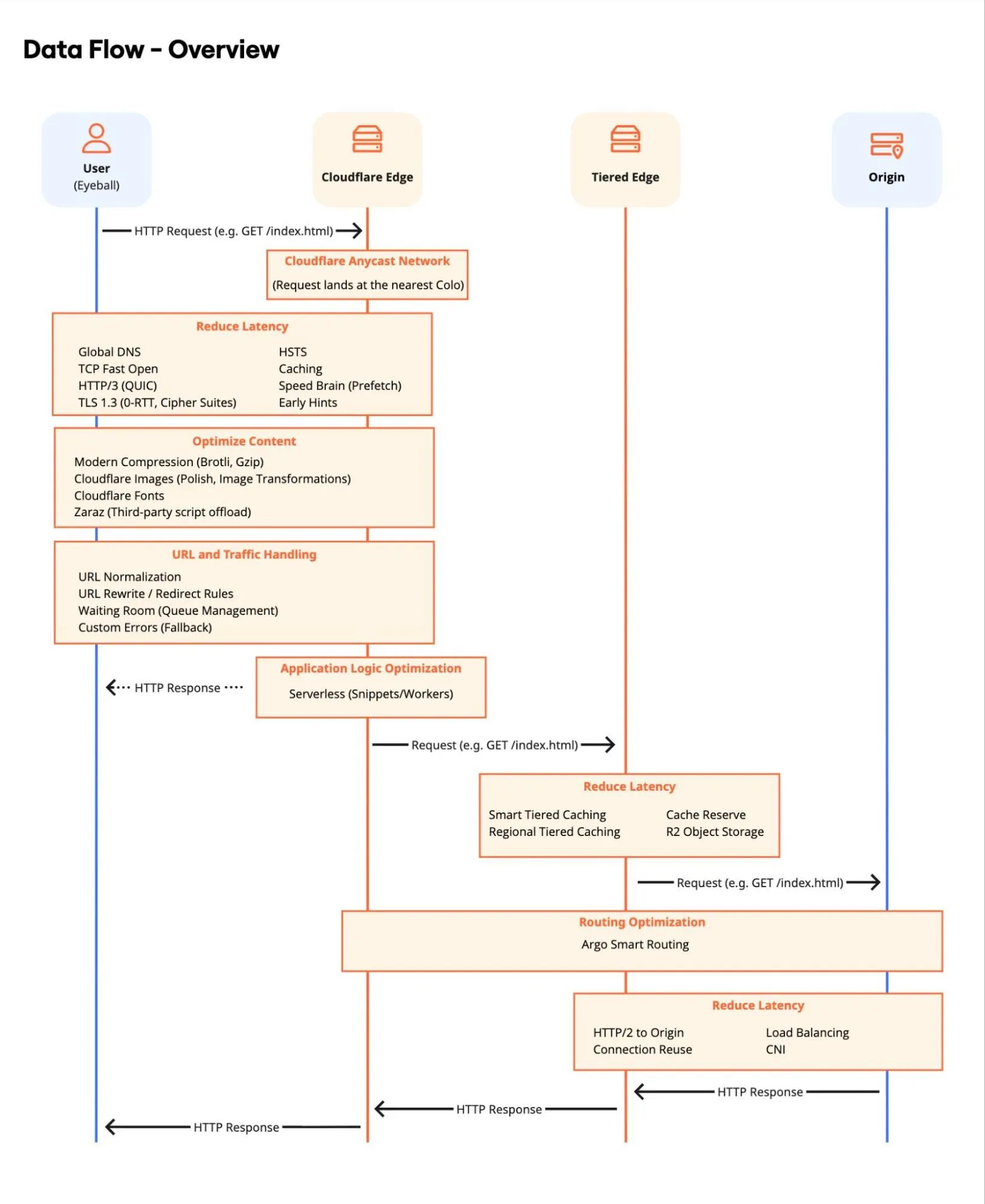
Minh họa từ Cloudflare Reference Architecture (developers.cloudflare.com) Illustration from Cloudflare Reference Architecture (developers.cloudflare.com)

Các bước thực hiện Step-by-step

  1. Đăng nhập Cloudflare Dashboard → Add a site → nhập domain. Log in to Cloudflare Dashboard → Add a site → enter your domain.
  2. Cloudflare quét DNS hiện có (hoặc import zone file). Cloudflare scans existing DNS (or import a zone file).
  3. Review từng record: A/AAAA/CNAME trỏ đúng origin; ghi chú MX, TXT, SRV. Review each record: A/AAAA/CNAME point to the right origin; note MX, TXT, SRV.
  4. Đổi nameserver tại registrar theo hướng dẫn — chỉ sau khi đã review. Change nameservers at your registrar as instructed — only after review.

Giải thích chi tiết Detailed explanation

Bước này không chỉ “thêm domain” — bạn đang chuyển quyền điều phối DNS sang Cloudflare. Sai một record có thể làm email ngừng hoạt động hoặc traffic đi nhầm server. This step is not just “add domain” — you are handing DNS control to Cloudflare. One wrong record can break email or send traffic to the wrong server.

Mẹo: Tip: Chụp screenshot bảng DNS trước khi đổi nameserver — tiện khi rollback. Screenshot your DNS table before changing nameservers — useful for rollback.

Lưu ý (best practices) Note (best practices)

Trước khi đổi nameserver: lên kế hoạch kỹ, hạ TTL trước, gỡ DS record DNSSEC nếu đang bật, kiểm tra lại import record và chuẩn bị kế hoạch rollback. Before changing nameservers: plan carefully, lower TTLs in advance, remove DS records if DNSSEC is enabled, double-check imported records, and prepare a rollback plan.

Nguồn: Source: DNS — Key considerations and best practices summary DNS — Key considerations and best practices summary

Ví dụ triển khai (Cloudflare Resources) Deployment examples (Cloudflare Resources)

Tutorial, solution guide và reference từ developers.cloudflare.com/resources ↗ — gợi ý theo chủ đề bài học. Tutorials, solution guides, and reference docs from developers.cloudflare.com/resources ↗ — matched to this lesson topic.

Duyệt toàn bộ catalog → Browse full catalog →

Tài liệu Cloudflare Developers Cloudflare Developer docs

Cloudflare API (tham khảo) Cloudflare API (reference)

Dùng khi tự động hóa bước này qua script hoặc Terraform — cần API token phù hợp. Use when automating this step via script or Terraform — requires an appropriate API token.

developers.cloudflare.com/api ↗

Sơ đồ kiến trúc (Cloudflare Docs) Architecture diagrams (Cloudflare Docs)

Figure 1: Data flow overview

Designing a distributed web performance architecture Designing a distributed web performance architecture

Pattern L7: data flow, cache tiers, deployment models — giảm latency và cải thiện Core Web Vitals. A prescriptive pattern for building a Cloudflare-based L7 performance architecture that reduces latency, raises cache efficiency, and improves Core Web Vitals.

Thuật ngữ: Concepts: CDN · Cache · Core Web Vitals · Smart Shield · Argo

Sơ đồ chính thức ↗ Official diagram ↗ · Content delivery Content Delivery

Sản phẩm liên quan Related products

Đọc thêm trong hub → Read more in the hub →