Lộ trình cho website hoặc API đang chạy: kiến trúc, khi nào dùng từng lớp, rồi lab bấm theo trên dashboard.A path for a live website or API: the architecture, when to use each layer, then a dashboard lab.A path for a live website or API: the architecture, when to use each layer, then a dashboard lab.
Phần 0: Kiến trúc và quy trìnhPart 0: Architecture and workflowPart 0: Architecture and workflow
·
Bài 1/1 Lesson 1/1 Lesson 1/1
Kiến thứcKnowledgeKnowledgeKhoảng 15 phútAbout 15 minAbout 15 min
Kiến trúc Application Services và thứ tự làmApplication Services architecture and the build orderApplication Services architecture and the build order
Không cần bài trước. No prerequisites. No prerequisites. Nếu DNS hay proxy còn mới, làm bước 0 trước.If DNS or the proxy is new, do step 0 first.If DNS or the proxy is new, do step 0 first.
Ý chínhMain ideasMain ideas
Khách vào site theo đường: DNS, rồi proxy (đám mây cam), SSL, WAF, cache, rồi mới tới origin. Làm đúng thứ tự đó. Khi nền chưa xong, đừng chuyển sang API Shield hay Load Balancing.A visitor reaches your site through DNS, then the proxy (orange cloud), SSL, WAF, cache, and only then the origin. Follow that order. Do not branch to API Shield or Load Balancing before the base is in place.A visitor reaches your site through DNS, then the proxy (orange cloud), SSL, WAF, cache, and only then the origin. Follow that order. Do not branch to API Shield or Load Balancing before the base is in place.
Cách hoạt độngHow it worksHow it works
Cloudflare đứng giữa khách và máy chủ của bạn. Record được proxy thì request HTTP đi qua mạng Cloudflare. Record chỉ DNS (đám mây xám) thì Cloudflare trả địa chỉ, không xem nội dung HTTP — WAF và cache không chạy trên record đó.Cloudflare sits between the visitor and your server. A proxied record sends HTTP through Cloudflare’s network. A DNS-only record (grey cloud) only returns an address. WAF and cache do not run on that record.Cloudflare sits between the visitor and your server. A proxied record sends HTTP through Cloudflare’s network. A DNS-only record (grey cloud) only returns an address. WAF and cache do not run on that record.
Kiến trúcArchitectureArchitecture
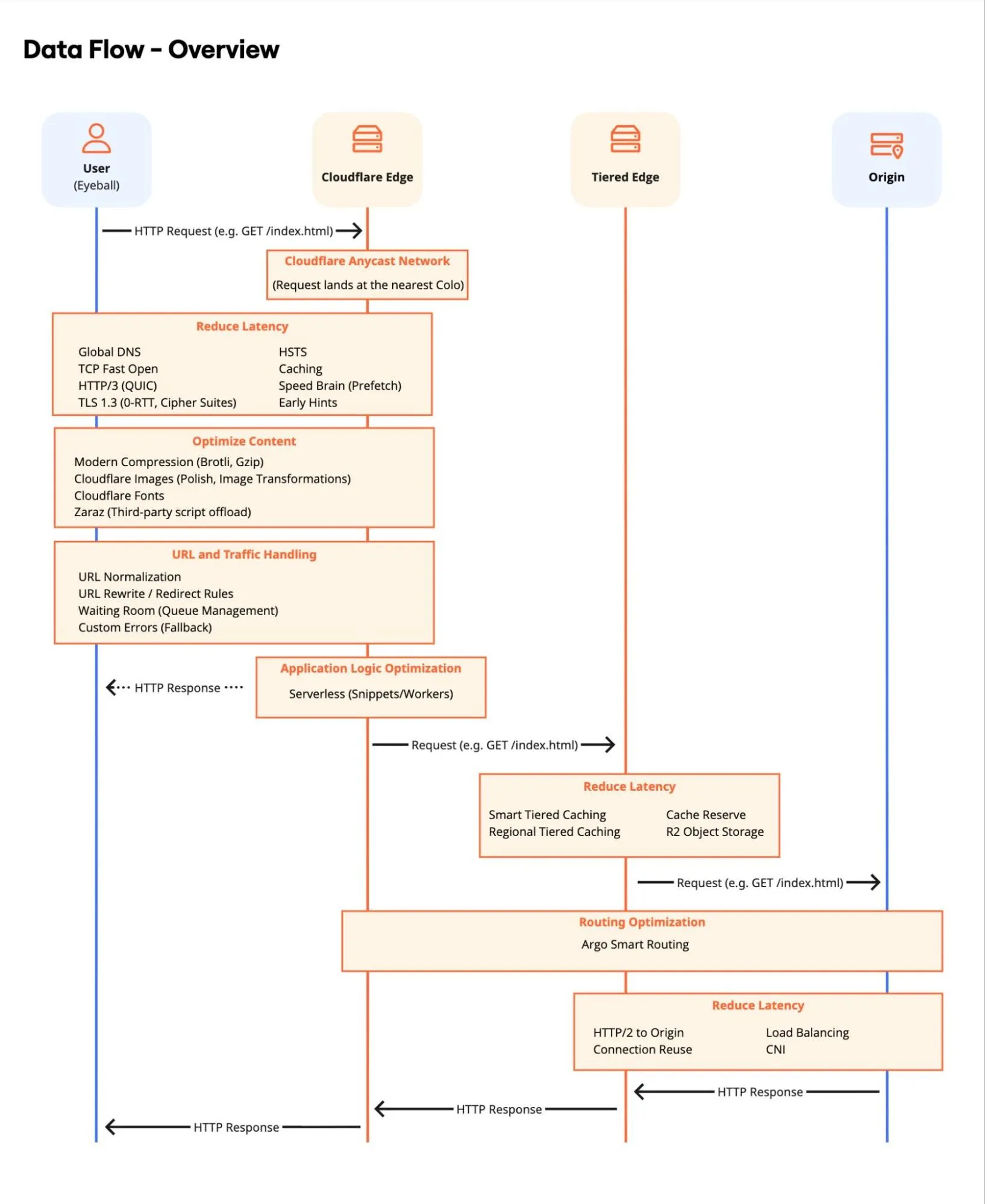
Thứ tự xây: (1) đưa domain lên và rà DNS, (2) bật proxy đúng hostname public, (3) SSL Full (strict) khi origin có chứng chỉ hợp lệ, (4) WAF và rate limit, (5) cache cho file tĩnh. API Shield, Load Balancing và Waiting Room là nhánh sau, khi nền đã chạy.Build order: (1) onboard the domain and review DNS, (2) proxy the public hostnames, (3) SSL Full (strict) when the origin has a valid certificate, (4) WAF and rate limiting, (5) cache for static files. API Shield, Load Balancing, and Waiting Room come after that base is working.Build order: (1) onboard the domain and review DNS, (2) proxy the public hostnames, (3) SSL Full (strict) when the origin has a valid certificate, (4) WAF and rate limiting, (5) cache for static files. API Shield, Load Balancing, and Waiting Room come after that base is working.
Sơ đồDiagramsDiagrams
Thiết kế kiến trúc hiệu năng web phân tánDesigning a distributed web performance architectureDesigning a distributed web performance architecture
Pattern L7: data flow, cache tiers, deployment models — giảm latency và cải thiện Core Web Vitals.A prescriptive pattern for building a Cloudflare-based L7 performance architecture that reduces latency, raises cache efficiency, and improves Core Web Vitals.A prescriptive pattern for building a Cloudflare-based L7 performance architecture that reduces latency, raises cache efficiency, and improves Core Web Vitals.
Thuật ngữ: Concepts: Concepts: CDN · Cache · Core Web Vitals · Smart Shield · Argo
Dùng lộ trình này khi bạn đã có website, web app hoặc API public và muốn Cloudflare đứng trước origin.Use this path when you already have a website, web app, or public API and you want Cloudflare in front of the origin.Use this path when you already have a website, web app, or public API and you want Cloudflare in front of the origin.
Khi nào không dùngWhen not to use itWhen not to use it
Đừng bắt đầu bằng API Shield hay Load Balancing nếu zone chưa Active và hostname public chưa Proxied. Hai sản phẩm đó không thay bước DNS và proxy.Do not start with API Shield or Load Balancing if the zone is not Active and the public hostname is not Proxied. Those products do not replace DNS and the proxy.Do not start with API Shield or Load Balancing if the zone is not Active and the public hostname is not Proxied. Those products do not replace DNS and the proxy.
Gói và giới hạnPlans and limitsPlans and limits
Bắt đầu bằng gói Free cho full setup (đổi nameserver) là đủ để học DNS, proxy và SSL. CNAME setup (partial) chỉ có trên Business và Enterprise — đó không phải Custom Hostnames / SSL for SaaS. Xem bảng ở đầu track. Nguồn: https://developers.cloudflare.com/dns/zone-setups/ (2026-11-11).Free is enough to learn DNS, the proxy, and SSL on a full setup (nameserver change). CNAME setup (partial) is Business and Enterprise only — that is not Custom Hostnames / SSL for SaaS. See the table at the top of the track. Source: https://developers.cloudflare.com/dns/zone-setups/ (2026-11-11).Free is enough to learn DNS, the proxy, and SSL on a full setup (nameserver change). CNAME setup (partial) is Business and Enterprise only — that is not Custom Hostnames / SSL for SaaS. See the table at the top of the track. Source: https://developers.cloudflare.com/dns/zone-setups/ (2026-11-11).
Không phải báo giá. Đối chiếu docs và dashboard. Kiểm tra lần cuối: 2026-11-11.Not a price quote. Check the docs and the dashboard. Last checked: 2026-11-11.Not a price quote. Check the docs and the dashboard. Last checked: 2026-11-11.
Thuật ngữGlossaryGlossary
OriginOriginOrigini
Máy chủ thật đang giữ website hoặc API của bạn.The server that actually hosts your website or API.The server that actually hosts your website or API.
ProxyProxyProxyi
Đám mây cam. Request HTTP đi qua Cloudflare.The orange cloud. HTTP requests go through Cloudflare.The orange cloud. HTTP requests go through Cloudflare.
Hiểu bức tranh User → DNS/proxy → SSL → WAF/Bot → Cache → Origin và thứ tự xây — trước khi đổi nameserver.See the picture User → DNS/proxy → SSL → WAF/Bot → Cache → Origin and the order you build it — before you change nameservers.មើលរូប User → DNS/proxy → SSL → WAF/Bot → Cache → Origin និងលំដាប់ដែលអ្នកសាង — មុនពេលអ្នកប្តូរ nameservers។
Ai làmWho does thisអ្នកធ្វើ
Chủ site / IT / DevOps / SecuritySite owner / IT / DevOps / Securityម្ចាស់ site / IT / DevOps / Security
Thời gianTimeរយៈពេល
15 phút đọc15 min read15 នាទីអាន
Kết thúc bạn sẽ cóYou'll finish withពេលបញ្ចប់អ្នកនឹងមាន
Quyết định đã ghi: domain, path login/API đầu tiên, plan, và bạn biết proxy phải bật trước WAF/cache.Written decisions: domain, first login/API path, plan, and you know proxy must be on before WAF/cache.ការសម្រេចចិត្តដែលបានសរសេរ៖ domain, path login/API ដំបូង, plan, និងអ្នកដឹងថា proxy ត្រូវតែបើកមុន WAF/cache។
Trước khi bắt đầuBefore you beginមុនពេលចាប់ផ្តើម
Một domain đang phục vụ traffic (hoặc staging). Không cần Worker.A domain already serving traffic (or staging). No Worker required.Domain មួយកំពុង serve traffic រួច (ឬ staging)។ មិនត្រូវការ Worker។
Cloudflare Application Services đặt một lớp giữa visitor và origin:
Visitor → DNS (nameserver hoặc CNAME) → Proxy (orange cloud) → SSL/TLS → WAF / Bot / Rate limit → Cache / Speed → Origin.
Làm theo thứ tự. Proxy tắt = Cloudflare chỉ trả lời DNS — WAF và cache không chạy. Dừng sau bất kỳ phần bắt buộc nào vẫn có giá trị (zone + SSL đã là win).Cloudflare Application Services sits between visitors and origin:
Visitor → DNS (nameservers or CNAME) → Proxy (orange cloud) → SSL/TLS → WAF / Bot / Rate limit → Cache / Speed → Origin.
Work in order. Proxy off = Cloudflare only answers DNS — WAF and cache do not run. Stopping after any required module still leaves something useful (a zone + SSL is already a win).Cloudflare Application Services ស្ថិតនៅចន្លោះ visitors និង origin៖
Visitor → DNS (nameservers ឬ CNAME) → Proxy (orange cloud) → SSL/TLS → WAF / Bot / Rate limit → Cache / Speed → Origin។
ធ្វើតាមលំដាប់។ Proxy បិទ = Cloudflare ឆ្លើយតែ DNS — WAF និង cache មិនរត់។ ការឈប់បន្ទាប់ពី module ណាមួយដែលត្រូវការ នៅតែទុកអ្វីមានប្រយោជន៍ (zone + SSL គឺជា win រួច)។
Làm theo từng bướcFollow alongធ្វើតាមជំហាន
1Viết bốn quyết định trước khi Add a site.Write four decisions before Add a site.សរសេរការសម្រេចចិត្ត 4 មុន Add a site។
Nhập: Enter: បញ្ចូល៖ 1) hostname production (www vs apex) 2) path nhạy cảm đầu tiên (/login hoặc /api) 3) plan hiện tại 4) ai giữ quyền registrar1) production hostname (www vs apex) 2) first sensitive path (/login or /api) 3) current plan 4) who holds registrar access1) production hostname (www vs apex) 2) path sensitive ដំបូង (/login ឬ /api) 3) plan បច្ចុប្បន្ន 4) អ្នកណារក្សា registrar access
Checkpoint: Checkpoint: Checkpoint៖ Bốn dòng đã ghi — không đoán khi đang đổi nameserver.Four lines written — do not improvise while changing nameservers.4 បន្ទាត់បានសរសេរ — កុំប៉ាន់ស្មានពេលកំពុងប្តូរ nameserver។
2Gắn mỗi lớp với module phía dưới.Map each layer to the modules below.ភ្ជាប់ស្រទាប់នីមួយៗទៅ modules ខាងក្រោម។
Bạn sẽ thấy: What you'll see: អ្នកនឹងឃើញ៖ DNS + review = Phần 1. Proxy = Phần 1 bài 2. SSL + origin lock = Phần 2. WAF/rate/bot = Phần 3. Cache/Speed = Phần 4. Observe = Phần 4 bài 4. API Shield và Load Balancing là tùy chọn sau nền.DNS + review = Part 1. Proxy = Part 1 lesson 2. SSL + origin lock = Part 2. WAF/rate/bot = Part 3. Cache/Speed = Part 4. Observe = Part 4 lesson 4. API Shield and Load Balancing are optional after the spine.DNS + review = Part 1។ Proxy = Part 1 lesson 2។ SSL + origin lock = Part 2។ WAF/rate/bot = Part 3។ Cache/Speed = Part 4។ Observe = Part 4 lesson 4។ API Shield និង Load Balancing ជាជម្រើសបន្ទាប់ពី spine។
3Chọn use case sau khi xong nền — không trước.Pick a use case after the spine — not before.ជ្រើស use case បន្ទាប់ពី spine — មិនមែនមុន។
Bạn sẽ thấy: What you'll see: អ្នកនឹងឃើញ៖ protect-website, secure-api, defend-ddos là cửa chọn. Track này xây DNS→proxy→SSL→WAF trước, rồi mới rẽ API Shield hoặc Load Balancing.protect-website, secure-api, and defend-ddos are doorways. This track builds DNS→proxy→SSL→WAF first, then branches to API Shield or Load Balancing.protect-website, secure-api, និង defend-ddos គឺជាច្រក។ Track នេះសាង DNS→proxy→SSL→WAF មុន, រួចសាខាទៅ API Shield ឬ Load Balancing។
Cẩn thậnWatch outប្រុងប្រយ័ត្ន
Đổi nameserver trước khi review MX/TXT — email và xác thực domain có thể gãy.Changing nameservers before reviewing MX/TXT can break email and domain verification.ការប្តូរ nameservers មុនពិនិត្យ MX/TXT អាចបំបែក email និង domain verification។
Bật WAF/cache khi record còn DNS only — không có hiệu lực trên HTTP.Turning on WAF/cache while the record is DNS only has no effect on HTTP.ការបើក WAF/cache ពេល record នៅតែ DNS only មិនមានឥទ្ធិពលលើ HTTP។
MẹoTipsគន្លឹះ
Nhiều team: ngày 1 zone + proxy + Full (strict); ngày 2 xem Security Events (action Log chỉ có trên Enterprise; gói khác dùng Managed Challenge trên path hẹp); tuần 2 cache rules và report.Many teams: day 1 zone + proxy + Full (strict); day 2 review Security Events (the Log action is Enterprise only; other plans use Managed Challenge on a narrow path); week 2 cache rules and a report.Many teams: day 1 zone + proxy + Full (strict); day 2 review Security Events (the Log action is Enterprise only; other plans use Managed Challenge on a narrow path); week 2 cache rules and a report.
Nhãn menu dashboard có thể đổi — chọn mục tương đương gần nhất.Dashboard labels shift — follow the nearest equivalent.Dashboard labels ផ្លាស់ — តាម equivalent ដែលជិតបំផុត។
Nguồn sự thật: tài liệu chính thức Cloudflare Developers (diễn giải, không sao chép nguyên văn). Nhãn menu dashboard có thể đổi — chọn mục tương đương gần nhất.Source of truth: official Cloudflare Developer docs (paraphrased, not copied verbatim). Dashboard labels shift — follow the nearest equivalent.ប្រភពពិត: official Cloudflare Developer docs (paraphrased)។ Dashboard labels ផ្លាស់ — តាម equivalent ជិតបំផុត។
Ví dụ chính thức từ Cloudflare Resources — gợi ý theo chủ đề bài học trong lộ trình này.Official examples from Cloudflare Resources — matched to this lesson within this path.Official examples from Cloudflare Resources — matched to this lesson within this path.
Hướng dẫn này cho thấy cách tạo một API cho phép bạn chạy truy vấn an toàn chống lại một cơ sở dữ liệu D1. API có thể được sử dụng để tùy chỉnh các điều khiển access và/hoặc giới hạn các bảng có thể được truy vấn.
This tutorial shows how to create an API that allows you to securely run queries against a D1 database. The API can be used to customize access controls and/or limit what tables can be queried.
ការបង្រៀននេះបង្ហាញពីរបៀបបង្កើត API ដែលអនុញ្ញាតឱ្យអ្នកដំណើរការសំណួរដោយសុវត្ថិភាពប្រឆាំងនឹងមូលដ្ឋានទិន្នន័យ D1 ។ API អាចត្រូវបានប្រើដើម្បីប្ដូរតាមបំណង access គ្រប់គ្រង និង/ឬកំណត់តារាងដែលអាចសួរបាន។
Học xong hoặc muốn đổi hướng?Finished or want a different path?Finished or want a different path?
Ba lộ trình độc lập — mỗi lộ trình chỉ gồm bài học và tài liệu trong phạm vi đó. Chọn lộ trình khác khi sẵn sàng, không cần học song song.Three independent paths — each includes only lessons and materials for that scope. Switch when you are ready; no need to study paths in parallel.Three independent paths — each includes only lessons and materials for that scope. Switch when you are ready; no need to study paths in parallel.