
Tối ưu content delivery & tăng tốc website Optimize content delivery & speed up your website Optimize content delivery & speed up your website
Hướng dẫn tăng tốc website với Cloudflare: CDN, cache rules, tối ưu delivery và đo lường — song song bảo mật trên cùng proxy (orange cloud). Phù hợp SME sau khi đã onboard DNS/SSL. Speed up websites with Cloudflare: CDN, cache rules, delivery optimizations, and measurement — on the same proxied (orange cloud) path as security. Ideal for SMEs after DNS/SSL onboarding. Speed up websites with Cloudflare: CDN, cache rules, delivery optimizations, and measurement — on the same proxied (orange cloud) path as security. Ideal for SMEs after DNS/SSL onboarding.
Mô hình tư duy Mental model Mental model
Static/cacheable → phục vụ từ PoP gần user (HIT). Dynamic/personalized → forward origin (MISS) nhưng vẫn được bảo vệ WAF/Bot tại edge. Mục tiêu: giảm byte và round-trip tới origin mà không cache nhầm session/cart. Static/cacheable → served from a nearby PoP (HIT). Dynamic/personalized → forwarded to origin (MISS) but still protected by edge WAF/Bot. Goal: fewer bytes and round trips to origin without caching sessions or carts by mistake. Static/cacheable → served from a nearby PoP (HIT). Dynamic/personalized → forwarded to origin (MISS) but still protected by edge WAF/Bot. Goal: fewer bytes and round trips to origin without caching sessions or carts by mistake.
Sơ đồ kiến trúc chính thức Official architecture diagrams Official architecture diagrams
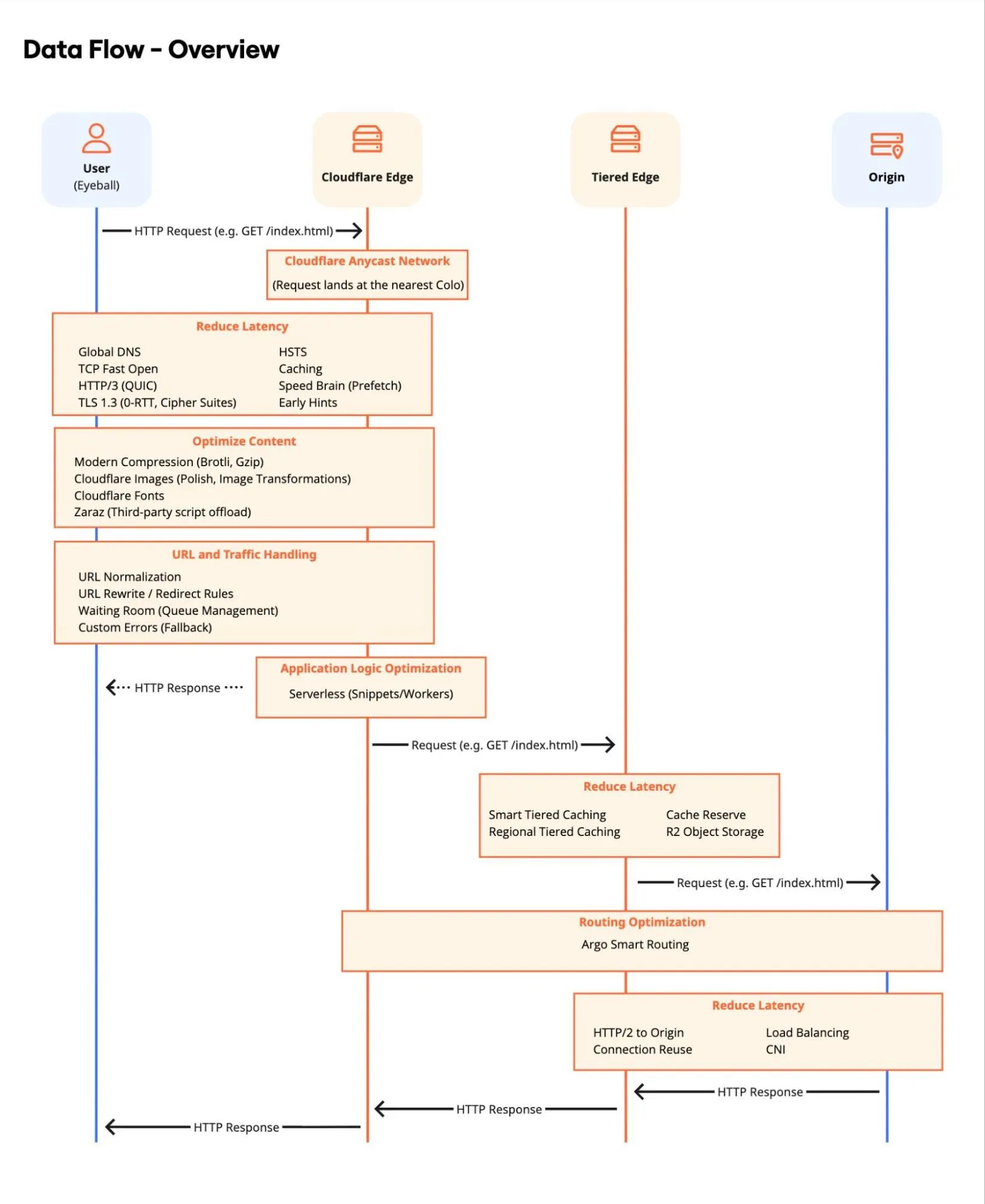
Thiết kế kiến trúc hiệu năng web phân tán Designing a distributed web performance architecture Designing a distributed web performance architecture
Pattern L7: data flow, cache tiers, deployment models — giảm latency và cải thiện Core Web Vitals. A prescriptive pattern for building a Cloudflare-based L7 performance architecture that reduces latency, raises cache efficiency, and improves Core Web Vitals. A prescriptive pattern for building a Cloudflare-based L7 performance architecture that reduces latency, raises cache efficiency, and improves Core Web Vitals.
Thuật ngữ: Concepts: Concepts: CDN · Cache · Core Web Vitals · Smart Shield · Argo
Sơ đồ chính thức ↗ Official diagram ↗ Official diagram ↗ · Phân phối nội dung Content Delivery Content Delivery
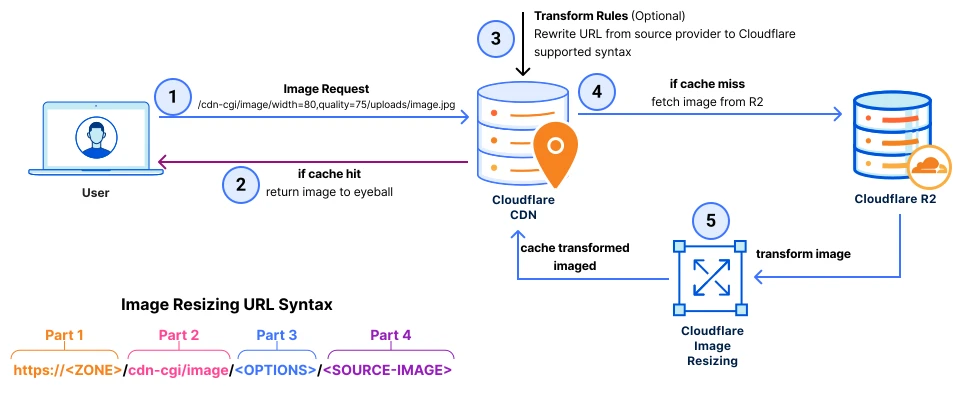
Tối ưu phân phối ảnh với Image Resizing và R2 Optimizing image delivery with Cloudflare image resizing and R2 Optimizing image delivery with Cloudflare image resizing and R2
Giải pháp tối ưu phân phối ảnh, mở rộng được và hiệu năng cao — Image Resizing kết hợp R2. Learn how to get a scalable, high-performance solution to optimizing image delivery. Learn how to get a scalable, high-performance solution to optimizing image delivery.
Thuật ngữ: Concepts: Concepts: Image Resizing · R2 · Transformations · Cache
Sơ đồ chính thức ↗ Official diagram ↗ Official diagram ↗ · Phân phối nội dung Content Delivery Content Delivery
CDN & cache mặc định CDN & default caching CDN & default caching
Cloudflare cache theo extension file; HTML thường không cache mặc định. Bật proxy (orange cloud) để traffic đi qua edge. Cloudflare caches by file extension; HTML is not cached by default. Enable proxy (orange cloud) so traffic hits the edge. Cloudflare caches by file extension; HTML is not cached by default. Enable proxy (orange cloud) so traffic hits the edge.
Caching > Overview, Caching > Cache Rules
- Xác nhận record website/API đã proxied Confirm website/API records are proxied Confirm website/API records are proxied
- Caching > Overview: xem cache status, hit ratio Caching > Overview: review cache status and hit ratio Caching > Overview: review cache status and hit ratio
- Cache static: CSS, JS, fonts, images — TTL hợp lý (ví dụ 1 ngày–1 tuần) Cache static assets: CSS, JS, fonts, images — sensible TTL (e.g. 1 day–1 week) Cache static assets: CSS, JS, fonts, images — sensible TTL (e.g. 1 day–1 week)
- Không cache trang có cookie session, cart, admin đã đăng nhập Do not cache pages with session cookies, cart, or logged-in admin Do not cache pages with session cookies, cart, or logged-in admin
Cache Rules (thay Page Rules cũ) Cache Rules (replaces legacy Page Rules) Cache Rules (replaces legacy Page Rules)
Điều kiện theo host, path, cookie, header — action: Bypass, Eligible, TTL custom, Serve stale. Match on host, path, cookie, header — actions: Bypass, Eligible, custom TTL, Serve stale. Match on host, path, cookie, header — actions: Bypass, Eligible, custom TTL, Serve stale.
Caching > Cache Rules
- Rule 1: Bypass cache cho /admin, /api/user, /checkout* Rule 1: Bypass cache for /admin, /api/user, /checkout* Rule 1: Bypass cache for /admin, /api/user, /checkout*
- Rule 2: Cache Everything (cẩn thận) chỉ cho path tĩnh đã kiểm tra Rule 2: Cache Everything (carefully) only for verified static paths Rule 2: Cache Everything (carefully) only for verified static paths
- Cookie bypass: cache key tách theo session khi cần (Business+) Cookie bypass: separate cache keys by session when needed (Business+) Cookie bypass: separate cache keys by session when needed (Business+)
- Sau deploy: purge cache hoặc purge by URL khi đổi asset After deploy: purge cache or purge by URL when assets change After deploy: purge cache or purge by URL when assets change
Tiered Cache & Argo Smart Routing Tiered Cache & Argo Smart Routing Tiered Cache & Argo Smart Routing
Tiered Cache giảm request tới origin (upper-tier PoP). Argo chọn đường mạng nhanh nhất tới origin — add-on, hữu ích user xa origin. Tiered Cache reduces origin requests (upper-tier PoP). Argo picks the fastest path to origin — add-on, helps users far from origin. Tiered Cache reduces origin requests (upper-tier PoP). Argo picks the fastest path to origin — add-on, helps users far from origin.
Caching > Tiered Cache, Traffic > Argo
- Bật Tiered Cache (thường kèm Argo) nếu hit ratio thấp và origin tải cao Enable Tiered Cache (often with Argo) if hit ratio is low and origin load is high Enable Tiered Cache (often with Argo) if hit ratio is low and origin load is high
- Theo dõi origin bandwidth trước/sau trong Analytics Monitor origin bandwidth before/after in Analytics Monitor origin bandwidth before/after in Analytics
- Argo: cân nhắc chi phí vs latency cho API động (Argo không cache response) Argo: weigh cost vs latency for dynamic APIs (Argo does not cache responses) Argo: weigh cost vs latency for dynamic APIs (Argo does not cache responses)
Speed — Auto Minify, compression, HTTP/3 Speed — Auto Minify, compression, HTTP/3 Speed — Auto Minify, compression, HTTP/3
Tối ưu delivery tự động: minify CSS/JS/HTML, Brotli, Early Hints, HTTP/2 & HTTP/3. Automatic delivery tweaks: minify CSS/JS/HTML, Brotli, Early Hints, HTTP/2 and HTTP/3. Automatic delivery tweaks: minify CSS/JS/HTML, Brotli, Early Hints, HTTP/2 and HTTP/3.
Speed > Optimization, Network
- Speed > Optimization: bật Auto Minify (test staging trước — có thể break inline JS) Speed > Optimization: enable Auto Minify (test in staging first — can break inline JS) Speed > Optimization: enable Auto Minify (test in staging first — can break inline JS)
- Bật Brotli, Early Hints cho LCP tốt hơn Enable Brotli and Early Hints for better LCP Enable Brotli and Early Hints for better LCP
- Network: HTTP/3 (QUIC) nếu client hỗ trợ Network: HTTP/3 (QUIC) where clients support it Network: HTTP/3 (QUIC) where clients support it
Cloudflare Images & resize Cloudflare Images & resizing Cloudflare Images & resizing
Transform ảnh tại edge (format WebP/AVIF, resize) — giảm payload và tải origin. Transform images at the edge (WebP/AVIF, resize) — smaller payloads and less origin load. Transform images at the edge (WebP/AVIF, resize) — smaller payloads and less origin load.
Images
- Dùng /cdn-cgi/image/ hoặc Workers để resize theo viewport Use /cdn-cgi/image/ or Workers to resize per viewport Use /cdn-cgi/image/ or Workers to resize per viewport
- Lazy-load phía HTML; Cloudflare xử lý format phía edge Lazy-load in HTML; let Cloudflare handle formats at the edge Lazy-load in HTML; let Cloudflare handle formats at the edge
Đo lường & Web Analytics Measurement & Web Analytics Measurement & Web Analytics
Cache Analytics, Speed overview, Core Web Vitals (Web Analytics) — chứng minh cải thiện cho stakeholder. Cache Analytics, Speed overview, Core Web Vitals (Web Analytics) — prove improvements to stakeholders. Cache Analytics, Speed overview, Core Web Vitals (Web Analytics) — prove improvements to stakeholders.
Caching > Analytics, Speed
- Caching > Analytics: hit/miss theo colo Caching > Analytics: hit/miss by colo Caching > Analytics: hit/miss by colo
- Speed > Observatory hoặc Web Analytics cho LCP/FCP/CLS Speed > Observatory or Web Analytics for LCP/FCP/CLS Speed > Observatory or Web Analytics for LCP/FCP/CLS
- So sánh origin request rate trước và sau tối ưu cache Compare origin request rate before and after cache tuning Compare origin request rate before and after cache tuning
Lỗi thường gặp Common mistakes Common mistakes
-
Cache trang đã đăng nhập Caching logged-in pages Caching logged-in pages
User A thấy nội dung user B — bypass cache khi có session cookie. User A sees User B’s content — bypass cache when session cookies are present. User A sees User B’s content — bypass cache when session cookies are present.
-
Quên purge sau deploy Forgetting purge after deploy Forgetting purge after deploy
CSS/JS cũ vẫn phục vụ từ edge — purge by URL hoặc toàn zone sau release. Old CSS/JS still served from edge — purge by URL or whole zone after release. Old CSS/JS still served from edge — purge by URL or whole zone after release.
-
Chỉ nhìn TTFB, bỏ qua LCP Only watching TTFB, ignoring LCP Only watching TTFB, ignoring LCP
Tối ưu ảnh hero và critical CSS — Web Analytics cho bức tranh đầy đủ. Optimize hero images and critical CSS — use Web Analytics for the full picture. Optimize hero images and critical CSS — use Web Analytics for the full picture.
Áp dụng trên track Application Services Apply on the Application Services track Apply on the Application Services track
Phần 4 của track đi sâu cache và analytics — kết hợp với WAF ở phần 3. Track part 4 goes deeper on cache and analytics — combine with WAF in part 3. Track part 4 goes deeper on cache and analytics — combine with WAF in part 3.